
 Vanilla
 Pixelmon
 Cobblemon
You are using an out of date browser. It may not display this or other websites correctly.
You should upgrade or use an alternative browser.
You should upgrade or use an alternative browser.
Skyblock Server Guide
- Created by benj on
- 481 views
Skyblock Guide
A thread on how to get started on Complex Skyblock
First and foremost, Welcome to Skyblock! It may seem daunting to start a new server fresh, but don’t worry! This guide will help lead you through your new journey with Complex Gaming.
Skyblock Starter Tips
Below a list of commands frequently used to play the game.
These essentials should cover what you need to start your journey.
A thread on how to get started on Complex Skyblock
First and foremost, Welcome to Skyblock! It may seem daunting to start a new server fresh, but don’t worry! This guide will help lead you through your new journey with Complex Gaming.
Skyblock Starter Tips
Below a list of commands frequently used to play the game.
These essentials should cover what you need to start your journey.
| /is | Lets you create and warp to an island. |
| /is invite <username> | Lets you invite another player to your island. |
| /tpa <username> | Sends teleport request to a specific player. |
| /pwarp | Teleports you to a selected player warp. |
| /pay <username> <amount> | Sends player the amount of money specified. |
| /shop | Give you access to the Skyblock store that uses in-game money. |
| /sell | Allows you to sell items from your hand to the Skyblock shop! |
| /trade <username> | Prompts user in the same zone to trade with you. |
| /ah | Opens auction house. |
| /ah sell <price> | Prompts you to sell the item in your hand for the price you entered. |
| /ah collect | Shortcut that allows you to collect an item you won from the auction house! |
| /warp quests | A place to earn free money, spawners, and more! |
| /vote | Prompts you to vote for the server. As a reward, you receive a vote key! |
| /resourcepack | Force a download on the resource pack for the server-specific items! |
| /ignore <username> | Hides selected player’s messages from your chat. |
| /discord | Provides a link to the discord for Complex Gaming’s Vanilla Servers! |
| /guide | Forgot something? Type this command in chat and the link to this guide will pop up! |
| /cf | Allows player to see available coinflip that are up to take. |
| /cf <amount> | Creates a coinflip worth the amount of igm or gc designated. |
| /cf hand | Creates a coinflip using the item in your hand. |
| /shoppers | Opens a small gui where you can buy a super hopper. Super hoppers can automatically transfer items to a distant chest or container. More down below! |
| /filter | Opens a gui where you can filter or delete items automatically. |
Spawn Warps
Spawn has a couple warps that can be used to get information about a lot of aspects of the game.
Below a list of commands that can be ran to get to these warps:
Spawn has a couple warps that can be used to get information about a lot of aspects of the game.
Below a list of commands that can be ran to get to these warps:
| /warp quests | Brings you to the quest giver. Quests are a category inside the leaderboard and could give you various rewards. |
| /warp blacksmith | Brings you to the blacksmith. Here you can repair broken tools or mend them. |
| /warp cosmetics | Brings you to an NPC that can give you cosmetics by paying 'mystery dust'. |
| /warp dailies | Brings you to an NPC where you can collect your free daily gifts. |
| /warp dungeon | Brings you to the entrance point of dungeons. Here you can earn dungeon coins by slaying monsters and defeating the boss. |
| /warp infuser | Brings you to an NPC where you can see every runes description and can purchase tomes for experience. |
| /warp istop | Brings you to a place where you can visually see the progress each top 10 island is making for istop. |
| /warp pvp | Brings you to the entrance point of a warzone-like place. Pvp is enabled here. |
| /warp resetvault | Brings you to the resetvault. The resetvault opens when a reset of the gamemode is nearing. |
| /warp timetraveler | Brings you to the timetraveler. This is some sort of auction for older seasonals. |
| /warp tomb | Brings you to the entrance of the Pharaoh's Tomb. Here you can earn various rewards, mostly gold shards, by defeating mobs. |
| /warp tutorial | Brings you to our tutorial NPC. |
Free resources
You can get various free stuff via any of the below commands.
They all have different cooldowns, so make sure to check them regularly to make sure you aren't missing out on free gadgets.
Note: (!) commands with an exclamation mark beside them are usable for players without any ranks!
You can get various free stuff via any of the below commands.
They all have different cooldowns, so make sure to check them regularly to make sure you aren't missing out on free gadgets.
Note: (!) commands with an exclamation mark beside them are usable for players without any ranks!
| /dailies (!) | Gives you money & experience pouches and mystery dust. Having a rank gives you more rewards. (18h cooldown) |
| /votes (!) | By clicking on the given link, you will be brought to our forum and voting links. By voting you get a free votekey. (24h cooldown) |
| /voteparty (!) | By having voted, you will get a free votekey every 350 votes. There is a rare chance of this being an anubis, horus or ra key. |
| /freescrolls | Free cluescrolls for players with a rank (scribe and above). Higher rank = better & more cluescrolls. (1-7 day cooldown) |
| /freetomes | Free runetomes for players that are soldier and above. (3 day cooldown) |
| /kits (!) | Sets of gear that get better when you rank up. |
| /jobs (!) | Gives you free money for the type of job you have selected. |
Starting your adventure
Creating an Island
To create an island begin by typing the command /is. Once you have done that, a GUI should pop up showing an emerald block. Click the first emerald block to create your own island. There are two options for you to choose from when making an island.
Once created, a confirmation message should show in chat that your island was created.
Note: Due to Prolonged Amounts of Inactivity and Lag Prevention, 6+ Months of Inactivity will result in an Automatic Island Wipe.
Creating an Island
To create an island begin by typing the command /is. Once you have done that, a GUI should pop up showing an emerald block. Click the first emerald block to create your own island. There are two options for you to choose from when making an island.
Once created, a confirmation message should show in chat that your island was created.
Note: Due to Prolonged Amounts of Inactivity and Lag Prevention, 6+ Months of Inactivity will result in an Automatic Island Wipe.
Option 1: Classic Island | Option 2: Oasis Island |
This island is good to start with if you want something easy to destroy so you can build your platform. | This island would be a good choice if you’re looking to start your journey and not worry about a lack of area to work around and run. |

| 
|
Navigating the /island GUI
Once you have made your own island. You can now type /is to open the Island GUI. When you first open the GUI, you will be shown your islands. From there you can either Left-Click to teleport to your island or Right-Click to manage your island.
In the Island Manage Menu, you will be given the following options (left to right):
- Island Ranks - View/manage ranks inside your island. New ranks can be create if the default 6 are not enough.
- Island Members - View/manage island members. You can set custom permissions per player here as well as custom withdrawal limits and more.
- Island Upgrades- View/purchase island upgrades. Click on the spoiler to look at all the upgrades and their price:
-
- Island Size
- Level 1: 100x100 (Default - Free)
- Level 2: 150x150 (Island Level 3 - $50M IGM)
- Level 3: 200x200 (Island Level 15 - $100M IGM)
- Level 4: 250x250 (Island Level 20 - $1B IGM)
- Level 5: 300x300 (Island Level 24 - $5B IGM)
- Island Member Size
- Level 1: 5 members (Default - Free)
- Level 2: 10 members (Default - $250M IGM)
- Island Warp Limit
- Level 1: 3 Warps (Default - Free)
- Level 2: 5 Warps (Default - $50M IGM)
- Level 3: 8 Warps (Island Level 8 - $100M IGM)
- Level 4: 10 Warps (Island Level 8 - $150M IGM)
- Island Public Warps Limit
- Level 1: 1 Public Warp (Default - Free)
- Level 2: 2 Public Warps (Island Level 7 - $500M IGM)
- Level 3: 3 Public Warps (Island Level 7 - $1B IGM)
- Spawner Limit
- Level 1: 50 spawners (Default - Free)
- Level 2: 75 spawners (Island Level 9 - $50M IGM)
- Level 3: 100 spawners (Island Level 13 - $150M IGM)
- Level 4: 150 spawners (Island Level 16 - $500M IGM)
- Level 5: 200 spawners (Island Level 21 - $1B IGM)
- Level 6: 250 spawners (Island Level 23 - $3B IGM)
- Minion Limit
- Level 1: 5 Minions (Default - Free)
- Level 2: 7 Minions (Island Level 6 - $5M IGM)
- Level 3: 10 Minions (Island level 11 - $25M IGM))
- Level 4: 14 Minions (Island level 13 - $250M IGM)
- Level 5: 18 Minions (Island level 16 - $1B IGM
- Level 6: 22 Minions (Island level 18 - $2.5B IGM)
- Level 7: 25 Minions (Island level 21 - $5B IGM)
- Minion Recruitment Slot Limit
- Level 1: 0 slots (Default - Free)
- Level 2: 1 Slot (Island Level 8 - $10M IGM)
- Level 3: 2 Slot (Island Level 14 - $25M IGM)
- Level 4: 3 Slot (Island Level 17 - $100M IGM)
- Level 5: 4 Slot (Island Level 20 - $500M IGM)
- Level 6: 5 Slot (Island Level 23 - $1B IGM)
- Level 7: 6 Slot (Island Level 25 - $5B IGM)
- Level 8: 7 Slot (Island Level 25 - $10B IGM)
- Hopper Limit
- Level 1: 150 Hoppers (Default - Free)
- Level 2: 250 Hoppers (Island Level 7 -$25M IGM)
- Level 3: 300 Hoppers (Island Level 12 -$100M IGM)
- Level 4: 350 Hoppers (Island Level 24 -$250M IGM)
- Level 5: 400 Hoppers (Island Level 24 -$500M IGM)
- Elevator Limit
- Level 1: 1 Elevator (Default - Free)
- Level 2: 2 Elevators (Default - $15M)
- Level 3: 3 Elevators (Default - $25M)
- Level 4: 4 Elevators (Default - $35M)
- Level 5: 6 Elevators (Default - $50M)
- Level 6: 8 Elevators (Default - $60M)
- Level 7: 12 Elevators (Default - $75M)
- Level 8: 16 Elevators (Default - $100M)
- Sell Portal Upgrade
- Level 1: 10% (Default - Free)
- Level 2: 12% (Island Level 6 - $50M IGM)
- Level 3: 14% (Island Level 11 - $100M IGM)
- Level 4: 16% (Island Level 15 - $500M IGM)
- Level 5: 18% (Island Level 20 - $1B IGM)
- Level 6: 20% (Island Level 25 - $5B IGM)
- Gold Shard Bank Limit
- Level 1: 500 Shards (Default - Free)
- Level 2: 2500 Shards (Island level 8 - $50M IGM)
- Level 3: 5000 Shards (Island level 12 - $100M IGM)
- Level 4: 10.000 Shards (Island level 14 - $500M IGM)
- Level 5: 15.000 Shards (Island level 17 - $1B IGM)
- Level 6: 25.000 Shards (Island level 19 - $5B IGM)
- Money Bank
- Level 1: $500M IGM (Default - Free)
- Level 2: $1B IGM (Island Level 5 - $50M)
- Level 3: $2.5B IGM (Island Level 10 - $250M)
- Level 4: $5B IGM (Island Level 15 - $500M)
- Level 5: $10B IGM (Island Level 19 - $1B)
- Level 6: $15B IGM (Island Level 22 - $2.5B)
- Level 7: $30B IGM (Island Level 25 - $5B)
- Vault Slots Limit
- Level 1: 9 Slots (Default - Free)
- Level 2: 18 Slots (Island Level 5 - $5M IGM)
- Level 3: 27 Slots (Island Level 5 - $10M IGM)
- Level 4: 36 Slots (Island Level 10 - $25M IGM)
- Level 5: 45 Slots (Island Level 10 - $30M IGM)
- Level 6: 54 Slots (Island Level 15 - $50M IGM)
- Level 7: 63 Slots (Island Level 15- $100M IGM)
- Level 8: 72 Slots (Island Level 22 - $200M IGM)
- Level 9: 81 Slots (Island Level 22 - $300M IGM)
- Level 10: 90 Slots (Island Level 23 - $500M IGM)
- Pharaoh's Realm(Please be aware you still need to set up a portal after buying this upgrade.)
- Level 1: Unlocked (Island Level 15 - $500M IGM)
- Pharaoh's Realm Resistance
- Level 1: 0% Slower (Default - Free)
- Level 2: 5% Slower (Island Level 17 - $50M IGM)
- Level 3: 10% Slower (Island Level 19 - $150M IGM)
- Level 4: 15% Slower (Island Level 21 - $300M IGM)
- Level 5: 20% Slower (Island Level 23 - $600M IGM)
- Level 6: 25% Slower (Island Level 23 - $1B IGM)
- End(Please be aware you still need to set up a portal after buying this upgrade.)
- Level 1: Unlocked (Island Level 20 - $1B IGM)
- Overworld Ore Generator
- Level 1: Iron, coal & stone (Default - Free)
- Level 2: More iron & coal (Island Level 2 -$5M IGM)
- Level 3: Addition of gold (Island Level 7 - $10M IGM)
- Level 4: Addition of redstone (Island Level 12 - $25M IGM)
- Level 5: Addition of lapis (Island Level 14 - $50M IGM)
- Level 6: Addition of diamond and the removal of stone (Island Level 17 - $75M IGM)
- Level 7: Addition of emerald (Island level 19 - $250M IGM)
- End Ore Generator
- Level 1: Purpur pillar, purpur block, endstone bricks and endstone (Default - Free)
- Level 2: Addition of diamond blocks (Island level 25 - $200M IGM)
- Level 3: Addition of emerald blocks (Island Level 25 - $400M IGM)
- Level 4: Higher changes for ore blocks (Island Level 25 - $600M IGM)
- Level 5: Higher chances for ore blocks (Island Level 25 - $800M IGM)
- Level 6: Higher chances for ore blocks & removal of purpur blocks and pillars (Island Level 25 - $1B IGM)
- Level 7: Higher chances for ore blocks (Island Level 25 - $1.2B IGM)
- Level 8: Addition of netherite blocks, slightly less chances for other ore blocks (Island level 25 - $1.5B IGM)
- Sapling Limit
- Level 1: 5 Saplings (Default - Free)
- Level 2: 10 Saplings (Default - $5M IGM)
- Level 3: 15 Saplings (Island Level 5 - $10M IGM)
- Level 4: 20 Saplings (Island Level 5 - $25M IGM)
- Level 5: 25 Saplings (Island Level 10 - $50M IGM)
- Level 6: 30 Saplings (Island Level 10 - $100M IGM)
- Level 7: 40 Saplings (Island Level 14 - $200M IGM)
- Level 8: 50 Saplings (Island Level 18 - $300M IGM)
- Sapling Drop Rate
- Level 1: 2.5% (Default - Free)
- Level 2: 2.75% (Default - $250M IGM)
- Level 3: 3.0% (Island Level 10 - $500M IGM)
- Level 4: 3.5% (Island Level 16 - $750M IGM)
- Mob Death XP Boost
- Level 1: 1.0x (Default - Free)
- Level 2: 1.10x (Default - $25M IGM)
- Level 3: 1.20x (Island Level 4 - $100M IGM)
- Level 4: 1.30x (Island Level 11 - $500M IGM)
- Level 5: 1.40x (Island Level 18 - $1B IGM)
- Level 6: 1.50x (Island Level 23 - $5B IGM)
- Mission Reroll
- Level 1: Unlocked (Default - $50M IGM)
- Island Size
-
- Island Size
- Level 1: 100x100 (Default - Free)
- Level 2: 150x150 (Island Level 3 - $25M IGM)
- Level 3: 200x200 (Island Level 15 - $50M IGM)
- Level 4: 250x250 (Island Level 20 - $500M IGM)
- Level 5: 300x300 (Island Level 24 - $2.5B IGM)
- Island Member Size
- Level 1: 6 members (Default - Free)
- Level 2: 8 members (Default - $50M IGM)
- Island Warp Limit
- Level 1: 3 Warps (Default - Free)
- Level 2: 5 Warps (Default - $25M IGM)
- Level 3: 8 Warps (Island Level 8 - $50M IGM)
- Level 4: 10 Warps (Island Level 8 - $75M IGM)
- Island Public Warps Limit
- Level 1: 1 Public Warp (Default - Free)
- Level 2: 2 Public Warps (Island Level 7 - $250M IGM)
- Level 3: 3 Public Warps (Island Level 7 - $500M IGM)
- Spawner Limit
- Level 1: 50 spawners (Default - Free)
- Level 2: 75 spawners (Island Level 9 - $25M IGM)
- Level 3: 100 spawners (Island Level 13 - $75M IGM)
- Level 4: 150 spawners (Island Level 16 - $250M IGM)
- Level 5: 200 spawners (Island Level 21 - $500M IGM)
- Level 6: 250 spawners (Island Level 23 - $1.5B IGM)
- Minion Limit
- Level 1: 3 Minions (Default - Free)
- Level 2: 4 Minions (Island Level 6 - $2.5M IGM)
- Level 3: 5 Minions (Island level 11 - $12.5M IGM))
- Level 4: 6 Minions (Island level 13 - $125M IGM)
- Level 5: 8 Minions (Island level 16 - $500M IGM
- Level 6: 10 Minions (Island level 18 - $1.25B IGM)
- Level 7: 12 Minions (Island level 21 - $2.5B IGM)
- Minion Recruitment Slot Limit
- Level 1: 0 slots (Default - Free)
- Level 2: 1 Slot (Island Level 8 - $5M IGM)
- Level 3: 2 Slot (Island Level 14 - $12.5M IGM)
- Level 4: 3 Slot (Island Level 17 - $50M IGM)
- Level 5: 4 Slot (Island Level 20 - $250M IGM)
- Level 6: 5 Slot (Island Level 23 - $500M IGM)
- Level 7: 6 Slot (Island Level 25 - $2.5B IGM)
- Level 8: 7 Slot (Island Level 25 - $5B IGM)
- Hopper Limit
- Level 1: 150 Hoppers (Default - Free)
- Level 2: 250 Hoppers (Island Level 7 -$12.5M IGM)
- Level 3: 300 Hoppers (Island Level 12 -$50M IGM)
- Level 4: 350 Hoppers (Island Level 24 -$125M IGM)
- Level 5: 400 Hoppers (Island Level 24 -$250M IGM)
- Level 6: 450 Hoppers (Island Level 24 - $500M IGM)
- Elevator Limit
- Level 1: 1 Elevator (Default - Free)
- Level 2: 2 Elevators (Default - $7.5M)
- Level 3: 3 Elevators (Default - $12.5M)
- Level 4: 4 Elevators (Default - $17.5M)
- Level 5: 6 Elevators (Default - $25M)
- Level 6: 8 Elevators (Default - $37.5M)
- Level 7: 12 Elevators (Default - $50M)
- Level 8: 16 Elevators (Default - $75M)
- Gold Shard Bank Limit
- Level 1: 500 Shards (Default - Free)
- Level 2: 2500 Shards (Island level 8 - $25M IGM)
- Level 3: 5000 Shards (Island level 12 - $50M IGM)
- Level 4: 10.000 Shards (Island level 14 - $250M IGM)
- Level 5: 15.000 Shards (Island level 17 - $500M IGM)
- Level 6: 25.000 Shards (Island level 19 - $2.5B IGM)
- Money Bank
- Level 1: $25M IGM (Default - Free)
- Level 2: $100M IGM (Island Level 5 - $25M)
- Level 3: $250M IGM (Island Level 10 - $50M)
- Level 4: $500M IGM (Island Level 15 - $100M)
- Level 5: $1B IGM (Island Level 20 - $250M)
- Level 6: $2.5B IGM (Island Level 25 - $500M)
- Level 7: $5B IGM (Island Level 25 - $1B)
- Vault Slots Limit
- Level 1: 9 Slots (Default - Free)
- Level 2: 18 Slots (Island Level 5 - $2.5M IGM)
- Level 3: 27 Slots (Island Level 5 - $5M IGM)
- Level 4: 36 Slots (Island Level 10 - $12.5M IGM)
- Level 5: 45 Slots (Island Level 10 - $15M IGM)
- Level 6: 54 Slots (Island Level 15 - $25M IGM)
- Level 7: 63 Slots (Island Level 15- $50M IGM)
- Level 8: 72 Slots (Island Level 22 - $100M IGM)
- Level 9: 81 Slots (Island Level 22 - $150M IGM)
- Level 10: 90 Slots (Island Level 23 - $250M IGM)
- Pharaoh's Realm(Please be aware you still need to set up a portal after buying this upgrade.)
- Level 1: Unlocked (Island Level 10 - $100M IGM)
- Pharaoh's Realm Resistance
- Level 1: 0% Slower (Default - Free)
- Level 2: 5% Slower (Island Level 17 - $50M IGM)
- Level 3: 10% Slower (Island Level 19 - $150M IGM)
- Level 4: 15% Slower (Island Level 21 - $300M IGM)
- Level 5: 20% Slower (Island Level 23 - $600M IGM)
- Level 6: 25% Slower (Island Level 23 - $1B IGM)
- End(Please be aware you still need to set up a portal after buying this upgrade.)
- Level 1: Unlocked (Island Level 20 - $500M IGM)
- Overworld Ore Generator
- Level 1: Iron, coal & stone (Default - Free)
- Level 2: More iron & coal (Island Level 2 -$2.5M IGM)
- Level 3: Addition of gold (Island Level 7 - $5M IGM)
- Level 4: Addition of redstone (Island Level 12 - $12.5M IGM)
- Level 5: Addition of lapis (Island Level 14 - $25M IGM)
- Level 6: Addition of diamond and the removal of stone (Island Level 17 - $37.5M IGM)
- Level 7: Addition of emerald (Island level 19 - $125M IGM)
- End Ore Generator
- Level 1: Purpur pillar, purpur block, endstone bricks and endstone (Default - Free)
- Level 2: Addition of diamond blocks (Island level 25 - $100M IGM)
- Level 3: Addition of emerald blocks (Island Level 25 - $200M IGM)
- Level 4: Higher changes for ore blocks (Island Level 25 - $300M IGM)
- Level 5: Higher chances for ore blocks (Island Level 25 - $400M IGM)
- Level 6: Higher chances for ore blocks & removal of purpur blocks and pillars (Island Level 25 - $500M IGM)
- Level 7: Higher chances for ore blocks (Island Level 25 - $600M IGM)
- Level 8: Addition of netherite blocks, slightly less chances for other ore blocks (Island level 25 - $700M IGM)
- Sapling Limit
- Level 1: 5 Saplings (Default - Free)
- Level 2: 10 Saplings (Default - $2.5M IGM)
- Level 3: 15 Saplings (Island Level 5 - $5M IGM)
- Level 4: 20 Saplings (Island Level 5 - $12.5M IGM)
- Level 5: 25 Saplings (Island Level 10 - $25M IGM)
- Level 6: 30 Saplings (Island Level 10 - $50M IGM)
- Level 7: 40 Saplings (Island Level 14 - $100M IGM)
- Level 8: 50 Saplings (Island Level 18 - $150M IGM)
- Sapling Drop Rate
- Level 1: 2.5% (Default - Free)
- Level 2: 2.75% (Default - $125M IGM)
- Level 3: 3.0% (Island Level 10 - $250M IGM)
- Level 4: 3.5% (Island Level 16 - $375M IGM)
- Mob Death XP Boost
- Level 1: 1.0x (Default - Free)
- Level 2: 1.10x (Default - $12.5M IGM)
- Level 3: 1.20x (Island Level 4 - $50M IGM)
- Level 4: 1.30x (Island Level 11 - $250M IGM)
- Level 5: 1.40x (Island Level 18 - $500M IGM)
- Level 6: 1.50x (Island Level 23 - $2.5B IGM)
- Mission Reroll
- Level 1: Unlocked (Default - $50M IGM)
- Island Size
-
- Island Settings- View/change island settings
- World settings (mob/animal spawning, rain, explosions, fire spread, border visibility, biome and island time (plus feature))
- Gameplay (pvp enabled/disabled)
- Access (whitelisted/locked island)
- Appearance (change the name/colors and icon of the island. You can also change the team chat colors here.)
- Island Permissions - View/edit island permissions.
- Island Bank - View/manage the bank. Here you can store/withdraw in-game money and gold shards.
- Island Warps - View/create island warps. Click on the emerald block to start creating your warp. Afterwards follow the instructions seen in chat.
- Island Vault - View/edit island vault
- Island Logs - View island logs. There are logs of members, ranks, upgrades, settings, warps, whitelists, vault and a general log.
- Island Recruitment - View/change recruitment status. This is used to check applications for the island.
- Island Browse - Brings you to the /pwarp menu. Here you can go to all kinda of warps.
- Island Leaderboard - View the island top leaderboard and see the changes to potentially adapt your strategy.
- Island Whitelist - View/manage whitelisted players. You can have a specific whitelist set for overworld and the end.
- Island Missions - View/start island minions. You can also see the lootpool for completing these missions.
- Island Levels - View/Unlock island levels. Some levels need to be paid in-game money. Others are done automatically.
- Island Minions- View/manage Minions.
- Minion Recruitment - Purchase recruitment slots in the island upgrade tab. Better upgrades equals better minion chances.
- Minions - Manage your minions by clicking on them. Check out the minion guide for more information!
- Island Milestones - View/collect island milestones. These milestones are needed to progress your island level.
- Delete/leave Island - Warning: Deleting really deletes your island! We have no memory of your old island.
Need To Know
Dynamic Economy
The shop economy within Skyblock is now a “dynamic” economy. This means that the more an item is sold, the more its value will decrease and vice versa. The less an item is sold, the more its value will increase - think supply and demand.
(Ex. If you are selling potatoes and 50 other players are also selling masses of potatoes, the value decreases. But if you swap to carrots when everyone else is still farming potatoes, your carrot value will likely have increased, reaping you more profit!)

Catch Up Discount
To keep gameplay fair, we have enabled a feature for island levels and milestones called the “catch-up discount”. This allows the island to work towards the milestones but at a reduced cost.

Time Traveler
Time Traveler (/warp timetraveler) appears every Saturday, selling seasonal crate items and tags from the past. Once the Time Traveler appears, items may be bid on with “GC” for 1 day which can NOT be viewed by other players.
Note: Bids cannot be canceled but will be refunded if a higher bid is met.

Infuser/Runes (/warp infuser)
Runes are server-specific enchantments that can be placed onto tools, armor, and weapons. The runes can be viewed at /warp infuser.
Dynamic Economy
The shop economy within Skyblock is now a “dynamic” economy. This means that the more an item is sold, the more its value will decrease and vice versa. The less an item is sold, the more its value will increase - think supply and demand.
(Ex. If you are selling potatoes and 50 other players are also selling masses of potatoes, the value decreases. But if you swap to carrots when everyone else is still farming potatoes, your carrot value will likely have increased, reaping you more profit!)
Catch Up Discount
To keep gameplay fair, we have enabled a feature for island levels and milestones called the “catch-up discount”. This allows the island to work towards the milestones but at a reduced cost.
Time Traveler
Time Traveler (/warp timetraveler) appears every Saturday, selling seasonal crate items and tags from the past. Once the Time Traveler appears, items may be bid on with “GC” for 1 day which can NOT be viewed by other players.
Note: Bids cannot be canceled but will be refunded if a higher bid is met.
Infuser/Runes (/warp infuser)
Runes are server-specific enchantments that can be placed onto tools, armor, and weapons. The runes can be viewed at /warp infuser.
There are five rune types - common, rare, legendary, mythical, and tomb runes. Runes can be placed onto tools, armor, and weapons by dragging and dropping combining the rune with the item. But be careful, it could fail and destroy your item! Each rune has percentages showing the success, failure, and critical fail rates. These success rate percentages can increase by adding lucky gems to your rune!
If you accidentally added a rune or decided you don’t like it on a tool, you can use a cleansing wand to remove it. Please note that if you do this you will not get the rune back, it will be destroyed.
Lucky gems and cleansing wands can be purchased (from /warp infuser) using experience (exp.)
- Common - Cost: 6250 XP
- Rare - Cost: 25,000 XP
- Legendary - Cost: 62,500 XP
- Mythical - Cost: 125,000 XP
Super Hoppers (/shoppers)
Super hoppers appear as normal hoppers but can be bought (from /shoppers) and upgraded to include more abilities. A super hopper can automatically transfer items to a distant chest or container. It also can filter items and can transfer faster than a normal hopper. To break a super hopper, shift and left-click with a pickaxe.
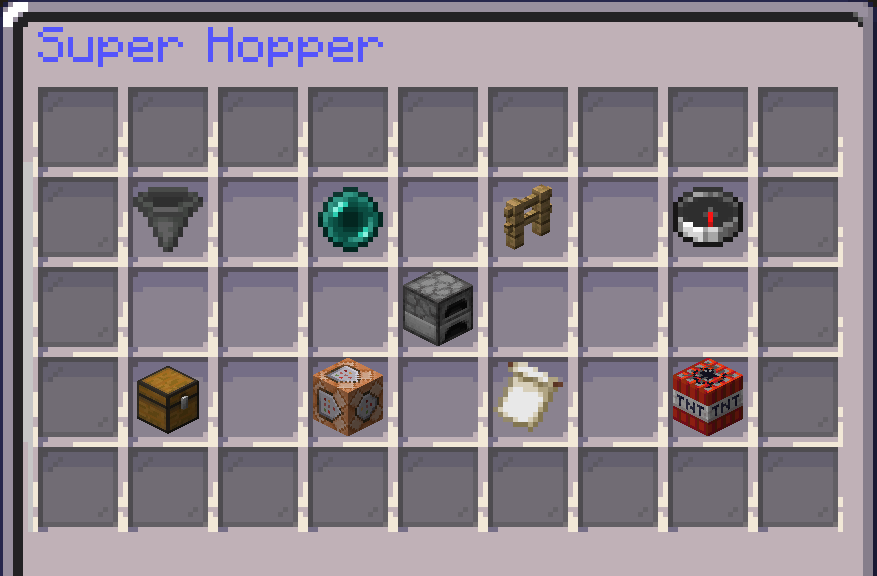
Filters within super hoppers
To add filtered items to a super hopper, reference the following:
Link the super hopper to a container or chest - make sure it is within linking distance. If you’re unsure of your link distance, look at the compass in the top right.

Next, click “manage links” or the command block icon. If you properly link an item to a chest, then a chest will appear, similar to the image shown. Note: In the image, the filter status says “disabled”. This means the filter will NOT work.

To change this filter issue, go ahead and click on the chest from the previous image. Now, look to the bottom right. There is a grey dye that shows the filter status. This should say “enabled”. Go ahead and click it and verify it is the status you want.

Within this same interface, on the bottom left, you will see an “edit filter” button. If that is clicked, you will be able to add items to the filter’s whitelist - meaning only that item will go into the super hopper and be transferred.

Island Top
Often referred to as “istop”, is a competitive addition to the Skyblock server where you can team up with up to 10 island mates and compete against other islands to bring in the most profit to your island. The goal is to achieve the #1 istop position!
Super hoppers appear as normal hoppers but can be bought (from /shoppers) and upgraded to include more abilities. A super hopper can automatically transfer items to a distant chest or container. It also can filter items and can transfer faster than a normal hopper. To break a super hopper, shift and left-click with a pickaxe.
Filters within super hoppers
To add filtered items to a super hopper, reference the following:
Link the super hopper to a container or chest - make sure it is within linking distance. If you’re unsure of your link distance, look at the compass in the top right.
Next, click “manage links” or the command block icon. If you properly link an item to a chest, then a chest will appear, similar to the image shown. Note: In the image, the filter status says “disabled”. This means the filter will NOT work.
To change this filter issue, go ahead and click on the chest from the previous image. Now, look to the bottom right. There is a grey dye that shows the filter status. This should say “enabled”. Go ahead and click it and verify it is the status you want.
Within this same interface, on the bottom left, you will see an “edit filter” button. If that is clicked, you will be able to add items to the filter’s whitelist - meaning only that item will go into the super hopper and be transferred.
Island Top
Often referred to as “istop”, is a competitive addition to the Skyblock server where you can team up with up to 10 island mates and compete against other islands to bring in the most profit to your island. The goal is to achieve the #1 istop position!
Island top resets at the beginning of each month, meaning you are competing for four weeks before you can be awarded! With Island Top, you can win up to $500GC & more to be split across your island members.
Want to participate with them? You must opt-in to become part of Island Top, which can be done by reaching level 5 of Island Levels and then finding the “Island Opt In” (the end portal frame) after running the command /istop
| /istop | Show the scoreboard for the istop islands. |
Sell Portals
Sell Portals are the ONLY way to earn Island Value for Island Top. Simply throw your items into your Sell Portal and they will be converted into /is top value. You can purchase these Sell Portals via /shop 7. This should be the last available block (crying obsidian).
Through your Island Upgrades, you can upgrade your Sell Portal for an increased percentage of value gained from items sold in the Sell Portal.
Note: Sell Portals CAN be broken once they have been placed. Simply break one of the crying obsidian blocks and the Sell Portal will return to your inventory.
Leaderboard
Leaderboard, often known as “LB”, is an individual competition against other players to have the highest points on the scoreboard by the end of the week. There are many different categories to choose from, the more you work towards, the more points you could have!
Leaderboard
Leaderboard, often known as “LB”, is an individual competition against other players to have the highest points on the scoreboard by the end of the week. There are many different categories to choose from, the more you work towards, the more points you could have!
| /lb | Show the scoreboard for leaderboard. |
Pharaoh's Realm
A new realm that can be accessed through an Ancient Portal which must be built on your island after finding eight different Ancient Artifacts. Within this realm, you can gain even more money and resources. But be careful - using Pharaoh Realm too much may cause the portal to break!
Pharaoh's Tomb (/warp tomb)
At the tomb, players will be greeted by hoards of mobs that can drop items like gold shards, tomes, spawners, boosters, and more!
However, some items, such as gold shards and treasure keys count as contraband. If killed by a player or mob, you will keep your inventory BUT contraband items. Items that count as contraband are noted when hovered over, as shown below.

The Pharaoh's Tomb has its own own guide here!
Chestshops
For the guide to chest shops, please click here!
/Sunday
Every Sunday there are perks that players receive. Perks such as lower votes needed for vote party, no tax on /ah listings, milestone progress increase, and increased drops for experience (exp.).
Cosmetics
Cosmetics such as banners, pets, and gadgets can be crafted using mystery dust. To do this, you will need to first craft the crates, then you can open them to receive the cosmetics.
A new realm that can be accessed through an Ancient Portal which must be built on your island after finding eight different Ancient Artifacts. Within this realm, you can gain even more money and resources. But be careful - using Pharaoh Realm too much may cause the portal to break!
Pharaoh's Tomb (/warp tomb)
At the tomb, players will be greeted by hoards of mobs that can drop items like gold shards, tomes, spawners, boosters, and more!
However, some items, such as gold shards and treasure keys count as contraband. If killed by a player or mob, you will keep your inventory BUT contraband items. Items that count as contraband are noted when hovered over, as shown below.
The Pharaoh's Tomb has its own own guide here!
Chestshops
For the guide to chest shops, please click here!
/Sunday
Every Sunday there are perks that players receive. Perks such as lower votes needed for vote party, no tax on /ah listings, milestone progress increase, and increased drops for experience (exp.).
Cosmetics
Cosmetics such as banners, pets, and gadgets can be crafted using mystery dust. To do this, you will need to first craft the crates, then you can open them to receive the cosmetics.
| /warp cosmetics | Takes players to an area where they can craft mystery crates and receive cosmetics. |
| /cosmetics | Brings up the interface to add cosmetics to your character. |
Extras
Reset Vault
Here on Complex Skyblock, we have a Reset Vault that allows you to save your items so that you can use them after the map has been reset. Reset Vaults will be unavailable until an upcoming reset is announced for Skyblock. Once the Reset Vault has been unlocked, you are able to save items to it so long as you have an available slot. However, there are some rules that apply when saving items:
- Once you have saved an item to your Reset Vault, it cannot be retrieved until the map has been reset.
- Stacked Items, Shulker Boxes, Spawners, Runes, Enchant Books and Pouches cannot be saved to the Reset Vault
- Enchanted items will lose all their enchants when added to the Reset Vault. For example a Diamond Pickaxe with Unbreaking 1 will turn into an unenchanted Diamond Pickaxe when you claim it from your Reset Vault.
- Crate Exclusive Items will keep all their enchants when added to the Reset Vault.
Clue Scrolls
Scrolls are an easy way to earn rewards by completing various tasks. Tasks can vary from breaking/placing blocks, typing something in chat, crafting an item in order to solve a riddle, and more. There are 3 types of scrolls on Skyblock: Cactus, Papyrus, and Emerald. Rewards from scrolls vary but can include items such as Boosters, Tags, Spawners, Diamond/Emerald Blocks, Minions, and much more! Scrolls can be obtained from crates, purchasing from /ah, or from /freescrolls if you have a rank.
Boosters
Boosters can be activated to increase all XP/Money by a set multiplier and for a set amount of time depending on the type of booster. Boosters can come with any type of multiplier, capped at 200%. Boosters can be obtained from Cluescrolls, Crates or Crate Items, or by purchasing them from /store. Boosters have one use and will be consumed after drinking.
Commonly Used Terms
Commonly Used Words you will see in Chat.
Scrolls are an easy way to earn rewards by completing various tasks. Tasks can vary from breaking/placing blocks, typing something in chat, crafting an item in order to solve a riddle, and more. There are 3 types of scrolls on Skyblock: Cactus, Papyrus, and Emerald. Rewards from scrolls vary but can include items such as Boosters, Tags, Spawners, Diamond/Emerald Blocks, Minions, and much more! Scrolls can be obtained from crates, purchasing from /ah, or from /freescrolls if you have a rank.
Boosters
Boosters can be activated to increase all XP/Money by a set multiplier and for a set amount of time depending on the type of booster. Boosters can come with any type of multiplier, capped at 200%. Boosters can be obtained from Cluescrolls, Crates or Crate Items, or by purchasing them from /store. Boosters have one use and will be consumed after drinking.
Commonly Used Terms
Commonly Used Words you will see in Chat.
| IGM - In Game Money | This is the currency local ONLY to Skyblock. It can be seen using the command /bal |
| GC - Gift Card | This is a form of currency that can be shared GLOBALLY through Complex Gaming servers. You can check your gc balance using /gc |
| Istop - Island Top | This is a competitive addition to the Skyblock server where you can be with up to 15 teammates and compete against other islands. The goal is to achieve #1 on /istop |
| Ponds | Ponds are contestable locations within tomb and pvp where players go fishing to reap benefits for their designated island. (/ponds) |
| Runes | This is a feature we have within Skyblock where you have server-specific enchantments that can be placed onto tools, armor, and weapons. (/warp infuser) |
| Lucky Gems | Items that increase a rune’s percentage of being successful. |
| Shards / Fuel | This is another name for gold shards. |
| Tomb | A PvP area where you can kill mobs to receive gold shards and later trade them for more expensive items (Hidden Treasures, exclusive tags, etc.) (/warp tomb) |
| Envoy | A chest that spawns within /warp pvp that drops items such as tags, spawners, money / exp boosters, and more! (/envoys) |
| Vote Party | Once the Skyblock server reaches a certain amount of votes (250 votes unless on /sunday), all players that have voted will receive an extra vote key and possibly a higher key as well! (/vp) |
| Minions | Minions are in-game NPC’s that will work for you. There are many types such as mining, farming, and slaying minions. |
| Scrolls | Scrolls are several quests bunched that players can do with the scroll in their inventory. There may be riddles to solve or quests to complete. To finish a scroll, you must start with the first quest/riddle to unlock the next, once that is complete, it will unlock another, and so on. Once the scroll is completed, you redeem it for rewards such as tags, spawners, and boosters! |
| Mystery Dust | This dust can be used to craft crates at /warp cosmetics! Once you craft a crate, then you can open it and receive cosmetics! |
| Boosters | Boosters are items that allow you to increase either the percentage of money OR experience that you can make when doing certain tasks. (ex. If a player is selling items, they may drink a potion to increase their profit by the percentage listed on the bottle.) |
| RV - Reset Vault | A vault where players can place their items during a server reset. Once an item is placed in the reset vault, it will be carried over to the next season safely. (/warp resetvault) |
We hope this can get you started on your journey to becoming a great Skyblock player! If you have any further questions make sure to ask the staff members that are online at the time, or the helpful community as they will be able to answer most of your questions!

Currently Viewing
Vanilla Wiki
General Information & Help
Partnership Guides
Complex Gaming
Check out our quick links for fast access to important locations on the forums!
Support Us
Check out our store to purchase ranks, items, and more!
Visit Store