
 Vanilla
 Pixelmon
 Cobblemon
You are using an out of date browser. It may not display this or other websites correctly.
You should upgrade or use an alternative browser.
You should upgrade or use an alternative browser.
Complex Factions Guide: Raiding, Cannons and FTOP
- Created by benj on
- 1420 views
- Last updated
Complex Gaming Factions Server Guide
How to get started on the Complex Gaming Minecraft Factions server
Short answer: Complex Factions is a free, competitive Minecraft Factions server on Complex Gaming (hub.mc-complex.com), built around raiding, TNT cannons, spawners and PvP, with new updates every month and full map resets every 4 weeks. To play, create a faction with /f create <name> (Noob or Pro), claim land with /f claim, build up spawners behind strong walls, and raid other factions of your type once the 10 day grace period ends. Every week, the top 6 factions on Faction Top win store gift cards. Join on Minecraft Java Edition (1.8 through the latest release, latest recommended) or Bedrock Edition on port 19132.How to get started on the Complex Gaming Minecraft Factions server
⚡ Quick facts
Server IP: hub.mc-complex.comVersions: Java 1.8 to latest (latest recommended), Bedrock supported
Season length: 4 week maps, top 6 factions win store gift cards
Features: raiding and TNT cannons, custom creeper eggs, 10 mob tiers, spawners, FTOP and PvP Top, Darkzone and Lightzone, Citadel, Raiding Outpost, outposts, envoys, runes
Store: https://store.mc-complex.com/
Discord: https://discord.gg/ComplexVanilla
Last checked: October 2026
Factions is a PvP game mode where players fight to their heart's content and bring explosions to all who oppose them. Build farms and place spawners, then surround them with walls as high as the build limit. Kill mobs to raise your mob tier, unlock higher valued spawners, and dominate the FTOP leaderboard.
Keep other factions from blowing into your base and stealing your hard earned valuables, or play it subtle and build a hidden base your enemies can't find. Build cannons and use custom creeper eggs to wreak havoc on any faction, and compete in 4 week long maps full of chaos and destruction.
Learn everything about Complex Factions with this guide, and team up with your friends to conquer the server.
📖 In this guide
Getting Started
Creating a faction and navigating the basics
Creating a Faction
To create a faction on Complex Factions, type /f create <name>. A confirmation message will appear in chat letting you know your faction has been created. You can then invite other players with /f invite <player>.Noob or Pro Faction
When you create a faction, you pick its type in a menu, or add it to the command: /f create <name> noob or /f create <name> pro.- Noob factions are made for new and casual players. They can only raid other Noob factions, get a raid shield of up to 24 hours, and have bigger base limits: up to 16 chunks of defenses, 12 chunks of regens and one 45.
- Pro factions are made for experienced raiders. They can only raid other Pro factions, earn double Faction Top points, get a raid shield of up to 6 hours, and have tighter base limits: up to 10 chunks of defenses, 6 chunks of regens and no 45s.
Recruitment
Don't want to create your own faction and just want to join one right away? Use /recruitment or /lff to open the faction recruitment menu, where you can see which factions are looking for new members.Select Faction Listings to see every recruiting faction, along with their player counts, placements and faction age. You can also see individual players who have applied under Player Listings, including how they rate themselves in different categories, their timezone and more. This is a great place to put yourself out there so factions can contact you directly and accept your application.
Navigating Basic Commands
Once you've created your faction, you can customize many different parts of it. Type /f for a list of all faction commands. Every command, and which faction rank can use it, is in the Factions Commands list.Key Commands
- /f claim <radius> - Once you've found a spot for your base, it is recommended that you claim the land around it. This stops other factions from accessing your land. To customize other factions' permissions in your land, use /f perms.
- /f unclaim - Unclaims the chunk you are standing in.
- /f baseclaim - Turns your claimed land into a base claim, which lasts for the entire season.
- /f autoclaim - Toggles automatic claiming, so every area you walk or fly through gets claimed.
- /f chat - Switches between Faction and Public chat. You can also pick a specific chat with /f c f (Faction) and /f c p (Public).
- /f who <player name / faction name> - Shows who is in a faction. Type a player's name to see their faction and all their teammates, or type a faction's name to see all of its members. It also shows general info about the faction, including Leader, Enemies, Power / Land, Online Players and Offline Players.
- /f promote - Promotes a player in your faction to a higher rank.
- /f demote - Demotes a player in your faction to a lower rank.
- /f leader - Transfers leadership to a member of your faction (Leader Only).
- /f sethome - Sets your faction's home.
- /f home - Teleports you to your faction's home. Only members you give permission to can use it.
- /f setwarp - Sets a warp inside your faction's claims. Only members with the right permission can use it.
- /f warp - Teleports you to an existing warp in your faction's claims.
Faction Perms and Upgrades
- /f permissions - Gives specific permissions to faction members, like breaking blocks in certain claims or using chunk busters.
- /f upgrades - A list of faction upgrades you can buy with in-game money, including increased damage in claimed land, no fall damage in claimed land, higher EXP drop rates, a bigger TNT bank and much more.
Claiming Land and Size Restrictions
- Claim land with /f claim and /f baseclaim. Your base claim and any land connected to it last for the entire season. Claims that aren't connected to your base (raid claims) last 3 hours and can be up to 7x7 chunks.
- /f map shows the factions around you, which is useful for finding bases to raid. Use /f map on to keep the map showing constantly, and /f map off to turn it off.
Base Defense and Raiding
Understanding base building and raiding
Base building is a key part of Complex Factions. A good base protects your items and spawners from being stolen or blown up! There are two main ways to build your base.First, you can build your base underground. Underground bases are risky because they are easier to break into, but they are harder to find. The other option is building above ground. Chunk Busters are a great way to clear every block down to bedrock so you have lots of room to build!
Protecting your base is vital, and different walls and defenses serve different purposes. Cobble and sand walls are cheap and efficient, but experienced raiders can get through them easily. Obsidian walls are a great way to strengthen your base. They are very expensive but keep you well protected, since obsidian has 3x the durability of cobblestone.
Adding liquids to your walls is a big advantage when stopping an attack, because creeper eggs cannot damage walls when they blow up in water or lava. This forces the enemy to build a TNT cannon to get into your base, which slows down their attack! Once you've built a solid base, check your walls often, since knowing a raid is happening drastically increases your chances of stopping it. A great way to spot an active attack is by checking your sand walls. When a sand wall gets blown up, the sand drops to the bottom and leaves a visible hole at the top of your base.
Effective Defenses
- Regen wall
- A regen wall is arguably the strongest defense, but it is very time consuming to build. There are many different regen wall layouts. Here is a video on how to build a basic regen wall. The water needs to be flowing and the lava needs to be source lava.
- Filters
- Filters are pillars placed every second block (horizontally and/or vertically). They are great for slowing down fly machines.
Raiding and Cannons
Raiding a base has a lot of upside, since you can take other players' spawners and items for yourself! The tricky part is getting inside. Players raid using cannons, fly machines or a mix of both. The server also sells ready to shoot cannons that build themselves, found on page 2 of /shop. For raid claims, raid timers, shields and Raid Camps, see How to Raid in Minecraft Factions.Once inside a base, you can PvP the players inside, loot their chests and even blow things up! Complex Factions has custom creeper eggs, each with its own unique ability:
- Creeper Eggs - Spawn regular creepers that blow up when close to players, or when hit with flint and steel.
- Charged Creeper Eggs - Spawn charged creepers, which have a much bigger explosion.
- Throwable Creeper Eggs - Right-click to throw them in the direction you're looking. Great for blowing up things suspended in the air.
- Throwable Charged Creeper Eggs - Can be thrown into the air and have a much larger blast radius.
Raid Events
Complex Factions runs several raid events. Use /raidevents to open a menu with more information. The Daily raid event starts at a random time between 11 AM and 6 PM ET, and its rewards scale as the map goes on. To see rewards and schedules, run /raidevents and hover over the event.Citadel
Citadel is a weekly event that rewards PvP points, money and experience. It is an outpost event where multiple factions compete under set limits, including a 15 minute death timer and 20 players per faction.To enter Citadel, use /citadel and select the concrete block at the bottom. You'll then be prompted to build a seasonal item kit with tools and armor. Note that this is timed, so if you wait too long it will auto select for you! Once selected, you'll enter the Citadel, a custom map, and your inventory will be filled with your chosen tools and armor plus golden apples and potions for PvP.
Your goal is to stop other factions from capturing the point. The point is shown in your HUD on the right side, along with capture progress, players on the point and in combat, and other useful information. Once the point is fully captured, the event ends and rewards are given out.
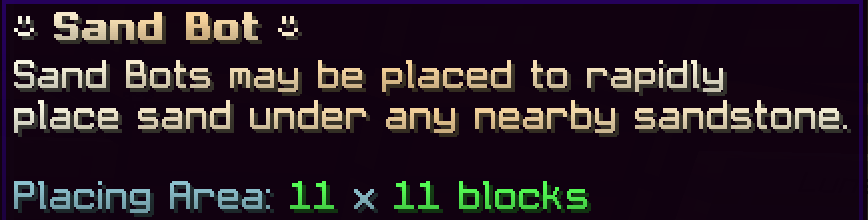
Sandbots
Sandbots automatically place sand, gravel and red sand underneath the matching blocks you place next to the sandbot.- Sandstone - Sand
- Andesite - Gravel
- Red Sandstone - Red Sand
- Once placed, right-click the sandbot to fill it with money (up to $500,000) so it starts printing blocks. You can disable printing whenever you like. When you're done, right-click it to despawn it and get back any money it hasn't used.
Cannoning Server (/cannon)
Key Features
- Protection blocks: There are three explosion protection blocks that each work differently. Emerald blocks protect all blocks above and below them, plus the emerald itself. Coal blocks protect all blocks above them, plus the coal block itself. Diamond blocks only protect the diamond block itself (great for worm platforms).
- Firing: /fire and /lever let you fire your cannons with a command. Once you right-click a lever or button on your plot, you can type /lever or /fire to fire your cannon without clicking it every time.
- Sand stack remover: When you arrive at your cannoning plot, you'll get a Sand Stack Remover. Left-click a stack of sand to remove all the sand above the spot you clicked. To get the item again, type /sandstackremover.
Raiding Outpost (/rpost)
The Raiding Outpost is a server wide raiding and PvP event where every faction competes to be the first to successfully raid an automatically generated base. Once your faction claims the Raiding Outpost, you'll need to defend it from other factions to keep the perks that come with controlling it!Each week, the Raiding Outpost resets, so every faction gets a fresh chance to raid it. Stay alert, because other factions may try to stop your raid and take it for themselves. Claiming the Raiding Outpost gives your faction 25% off at the Golden Merchant inside the Rpost, where you can trade Gold Shards for awesome rewards, plus 50% faster crop growth.
Farming, Spawners and Mob Tiers
The basics of making money
Farming
An efficient farm is a must when starting your faction. You'll need money and resources to build defenses and raiding materials like walls and cannons. The best farms to start with are automated cactus and sugarcane farms.Spawners
Once your cactus and/or sugarcane farm is running, spawners are the next step in growing your faction. They are most powerful once you've unlocked all 10 mob tiers listed below. Stray/Husk and Evoker spawners are the most important for gaining EXP. Creeper, Iron Golem and Evoker spawners are the most important for collecting mob drops (Gunpowder, Iron and Emeralds) to sell in /shop for money.Mob Tiers
Complex Factions uses Mob Tiers to unlock spawners during the first 10 days of each map. Your whole faction's mob kills count toward each tier. At the start you can only buy Chicken and Endermite spawners from /shop, and each Mob Tier below unlocks more. Once the 10 day grace period ends, every spawner in /shop unlocks for everyone.- Mob Tier 1
- Chicken / Endermite
- Unlocked by default
- Mob Tier 2
- Pig & Cow
- Requires 10,000 Chicken/Endermite kills to unlock
- Mob Tier 3
- Rabbit & Slime
- Requires 20,000 Pig/Cow kills to unlock
- Mob Tier 4
- Creeper / Zombie
- Requires 30,000 Rabbit/Slime kills to unlock
- Mob Tier 5
- Stray & Husk
- Requires 40,000 Creeper/Zombie kills to unlock
- Mob Tier 6
- Magma Cube / Zoglin
- Requires 50,000 Stray/Husk kills to unlock
- Mob Tier 7
- Skeleton & Spider
- Requires 65,000 Magma Cube/Zoglin kills to unlock
- Mob Tier 8
- Iron Golem & Polar Bear
- Requires 80,000 Skeleton/Spider kills to unlock
- Mob Tier 9
- Piglin & Enderman
- Requires 105,000 Iron Golem/Polar Bear kills to unlock
- Mob Tier 10
- Evoker & Wither Skeleton
- Requires 150,000 Piglin/Enderman kills to unlock
Darkzone & Lightzone
Darkzone is the Complex Factions PvP and PvE area where you fight monsters for high level loot like Runes, Gold Shards, Diamonds and more. Darkzone has its own Outpost, just like the Warzone Outpost, but with a different bonus when captured. Be careful, enemy players can enter Darkzone to kill you, steal your loot and take control of the world.To enter Darkzone, search the Warzone for portals named Darkzone Entrance. Right-click the portal and you'll be teleported straight to Darkzone, ready to start grinding mobs!
Lightzone is an alternate area where you fight mobs for Runes, Spawners, Items and more! Lightzone has different gear you can get from killing mobs. Tiers 1 and 2 are PvE only, so you don't have to worry about other players attacking you and stealing your gear. Tier 3 has PvP and its own Outpost. To enter Lightzone, use the Lightzone NPC at /spawn or run /lightzone, then pick a tier to be teleported straight in!
Run /darkzone or /lightzone to see the important information for each zone. Lightzone has 3 tiers of difficulty (T1, T2 and T3), unlocked based on mobs killed, with loot that scales by tier. Darkzone has one loot pool that gets better every week of the map, but it is more difficult. Drop rates, tier unlocks and outpost bonuses are in the Darkzone and Lightzone Guide.
Value and Placements
How to get Faction Value and secure Faction Top / PvP Top
Faction Value
Faction Value is based on the total spawners a faction has. You can check it with /ftop and /f who. Placed spawners are worth nothing for their first 48 hours, then grow in value until they reach full value after 14 days, so value will change during that time. Spawners also lose efficiency when more than 500 of the same type are within 20 chunks of each other (creepers drop off faster), so spread big stacks out. Right-click a spawner to see its efficiency, or type /efficiency for how it works. Use /shop 6 in game to see all spawners and prices. Spawners are a huge reason to raid enemy factions.Faction Top
Faction Top (FTOP) is a great way to earn store credit by being the top faction with the most value. Every week, the top 6 factions by value win Store Gift Cards (50, 40, 35, 30, 25 and 20 GC), and the top 3 also get 3, 2 and 1 Plus vouchers. Each week's top 10 also earn FTOP points, from 10 points for 1st down to 1 for 10th, doubled in the final week. Pro factions earn double points. The faction with the most points at the end of the map wins the season. Check points with /f points. See the current top factions with /f top or by visiting /warp ftop. End of season rewards for the top factions can be viewed at the /warp ftop hologram.PvP Top (/pvptop)
PvP Top is another way to earn end of season rewards for your faction. It works like Faction Top, but points come from accomplishments in PvP areas. The biggest payouts come from Conquest (500, 375 and 250 points for 1st, 2nd and 3rd) and Citadel (375), then the Daily Warzone (150) and outpost captures (90 each, and outposts reopen every 3 hours). You also earn points by holding KOTH, killing players in full netherite during outpost fights and in the Darkzone, winning Last Man Standing and killing Darkzone bosses. Be careful, dying during an outpost fight costs you points.Warzone, Duels, and Envoys
All you need to know about PvP on Factions
Warzone
If you're looking to test your PvP skills against other players, the Warzone is the place. PvP is enabled in the Warzone, so make sure you're prepared to fight. If you die, you lose all the items in your inventory. You'll be sent to spawn when you die, but you can return by entering the drop zone.Duels
Duels are a more casual way to PvP on Factions without risking your valuables. Duels support money wagers (minimum $10,000), custom maps and a variety of kits to choose from. Use /duels or /duel (player) for more info.Envoys
Envoys are loot chests that drop into the Warzone every hour. You'll be alerted in chat when an Envoy is dropping. Once it lands, it takes 5 minutes to unlock, and during that time other players will try to kill you so they can open it and take the loot. Envoys can contain spawners, spawn eggs, mob tier pouches and more. To see all possible rewards, use /envoys.Envoy Flares
Envoy Flares let you summon your own Envoy into the Warzone at any time. You can have one flare Envoy of your own active at a time. You can get Envoy Flares from crates or buy them on the auction house. When a flare is used, chat announces that a player has called in an Envoy. Flare Envoys unlock 1 minute after they land, and anyone can open them, so watch out for nearby players.Daily Rewards
Daily things you can do to get money easily
Voting
Voting is a quick and easy way to get money on Complex Factions. Type /vote in game and a link will pop up in chat that takes you to all 8 vanilla voting sites. Each site gives you rewards for voting for the Complex Network. Once your vote goes through, you receive 1 Vote Key, $500, 5 Mystery Dust and 15 minutes of Flight Time per voting link. You can vote once every 24 hours.Vote Parties
Vote Parties are an easy way to get crate keys without spending money on our /store. A vote party starts every 150 votes, and chat will alert you 1 minute before it begins. Check vote party status with /voteparty. When the vote party starts, you get 3 Vote Keys, 12 TNT and $5,000, plus an 8% chance at a Lunar Key and a 3% chance at a Solar Key. To be eligible for vote party rewards, you need to have voted at least once in the past 24 hours. Check with /haveivotedtoday.Dailies
Another way to get daily rewards is by typing /dailies in chat, which opens a menu where you can collect them. As a member, you can collect your daily reward every 18 hours, and buying a rank on the store unlocks more rewards each day (use /store to get the store link).Runes, Reset Vault and More
Special things available to you on Factions
Infuser and Runes
Runes are Complex Factions' custom enchants. You can get runes from the infuser at /warp infuser, which opens a menu showing which runes you can buy. There are 4 tiers available to purchase:- Common - 3,150 XP each
- Rare - 12,600 XP each
- Legendary - 31,500 XP each
- Mythical - 63,000 XP each
Below that is the magnifying glass, where you can identify the type, level and chance of unidentified runes found with the Rune Detector enchant. Rune Detector has a chance to drop unidentified runes when mining ores, and higher Rune Detector levels drop higher tier runes.
Next to the Rune Identifier is the clover, where you can buy Lucky Gems to increase the chance of your rune applying to your gear or tools. Each rune has a Success, Fail and Critical Fail percentage, and the more lucky gems you apply, the higher your Success percentage.
Hover over the book with a question mark to read more about Success, Fail and Critical Fail percentages.
Next to that book is the rune incinerator, where you can destroy any unwanted rune and convert it into its XP value.
Lastly, there are cleansing wands. A cleansing wand removes a single unwanted rune or enchant from any gear or tool, and is used up when you use it.
Reset Vault
The Reset Vault lets you save items to use after the map resets. It stays locked until an upcoming Factions reset is announced. Once it's unlocked, you can save items to it as long as you have an open slot. A few rules apply:- Once an item is saved to your Reset Vault, it can't be taken out until the map resets.
- Stacked items, shulker boxes, spawners, runes, enchant books and pouches cannot be saved to the Reset Vault. 1 item per slot.
- Enchanted items lose all their enchants when added to the Reset Vault. For example, a Diamond Pickaxe with Unbreaking 1 comes back as an unenchanted Diamond Pickaxe.
- Seasonal items keep their base enchants when added to the Reset Vault, but not any runes or enchants added later. They come back exactly how they were when first pulled from the seasonal crate.
Leaderboards
Weekly leaderboards are a great way to earn store credit for ranks, crate keys, boosters, tools and more! You earn Leaderboard Points by placing in the top 10 of any /leaderboard category. At the end of each week, the top 12 players with the most points are rewarded with store credit.Auction House
The Auction House is another vital part of the Factions economy. You can buy and sell items that aren't available in the regular /shop, like Tags, Runes, XP, Gold Shards and more. Selling rare and exclusive items on the Auction House is an important way to earn extra money. Open it with /ah in game, and items you buy will appear in /ah collect.The Blacksmith
The Blacksmith is an NPC at spawn (or /warp blacksmith) that restores durability on your gear, or fully restores it if it's shattered (out of durability). You'll need a Mending Glyph to restore durability, or a Reforge Glyph to fully restore a shattered item. These glyphs aren't guaranteed to work. They have a chance to fail and make you lose a random rune, so it's recommended to max out the percentages shown on the glyphs with Lucky Gems before using them!Watch: Factions video guide
How to Solo Raid Rich Minecraft Factions by Hxroic
Frequently Asked Questions
What is the IP for Complex Gaming Factions?
The IP is hub.mc-complex.com. It works on Minecraft Java Edition 1.8 through the latest release (latest recommended) and on Bedrock Edition, with Java and Bedrock crossplay.
How long is a Complex Factions season?
Each Factions map lasts 4 weeks, with new updates every month. Every week, the top 6 factions by value win Store Gift Cards, and the map fully resets at the end of the season.
How do I create or join a faction?
Use /f create <name> to create a faction and /f invite <player> to invite friends. To join an existing faction, use /recruitment or /lff to browse factions that are recruiting.
What is the difference between Noob and Pro factions?
Noob factions can only raid other Noob factions, get a raid shield of up to 24 hours and have bigger base limits. Pro factions can only raid other Pro factions, earn double Faction Top points and get a raid shield of up to 6 hours. You pick the type when you create your faction.
How do I unlock spawners on Complex Factions?
During the first 10 days of a map, spawners unlock through 10 Mob Tiers. Your faction starts with Chicken and Endermite spawners, and each tier unlocks new spawners after a set number of faction mob kills, up to Evoker and Wither Skeleton at Mob Tier 10. After the 10 days, every spawner is unlocked.
What is the difference between Darkzone and Lightzone?
Darkzone is a harder PvP and PvE area with an Outpost and high level loot, where other players can kill you and steal your loot. Lightzone has 3 difficulty tiers (T1 and T2 are PvE only, T3 has PvP) and gear you can't get anywhere else.
What carries over when Complex Factions resets?
Only items stored in the Reset Vault, one item per slot. Spawners, stacked items, shulker boxes, runes, enchant books and pouches cannot be saved, and enchanted items lose their enchants. Seasonal items keep their base enchants.
Is Complex Gaming Factions free to play?
Yes. Complex Factions is free to play. Ranks and crate keys are optional and available on the store.
How do you play Factions on Complex Gaming?
Create a faction with /f create <name> or join one with /recruitment, claim land with /f claim, and build a base with spawners and strong walls. Once the 10 day grace period ends on Complex Factions, defend your base and raid other factions of your type. New players can start with How to Play Factions in Minecraft.
How do you raid on Complex Factions?
Make a raid claim near the enemy base (up to 7x7 chunks, lasting 3 hours), build a TNT cannon inside it and shoot through their walls, then pop their spawners with creeper eggs. On Complex Factions, Noob factions can only raid Noob factions and Pro factions can only raid Pro factions. The full walkthrough is in How to Raid in Minecraft Factions.
How do you get PvP Top points on Complex Factions?
Win the big events: Conquest pays 500, 375 and 250 points to the top 3 factions, Citadel pays 375, the Daily Warzone 150 and each outpost capture 90. Complex Factions also gives PvP Top points for holding KOTH, full netherite kills in outpost fights and the Darkzone, Last Man Standing wins and Darkzone boss kills. Check the standings with /pvptop.
We hope this helps you get started on your journey to becoming a great Factions player! If you have any more questions, ask the staff members online at the time or our helpful community, who can answer most of your questions!
🎮 Ready to play?
hub.mc-complex.comJava 1.8 to the latest release (latest recommended), or Bedrock on port 19132
Use the compass or NPCs at the hub
📚 Keep reading
- How to Win Free GC: Every Leaderboard on Complex
- Factions Commands: Full /f Command List
- Factions Darkzone and Lightzone Guide
- How to Raid in Minecraft Factions
- Complex Factions Server: Java & Bedrock IP and features
- Factions Vaults and Regions Guide
- Backpack Guide: Upgrades and Costs
- How to Play Factions in Minecraft
- Creator Video Guides
- What Is Complex Gaming? Network, IPs and Stats
Skyblock Guides
Prison Guides
Factions Guides
Survival Guides
Minecraft Tips & Guides
Complex Gaming Network Information
Complex Gaming Partner Guides
Complex Gaming
Check out our quick links for fast access to important locations on the forums!
Support
Need assistance with purchases, or help in general?