
 Vanilla
 Pixelmon
 Cobblemon
You are using an out of date browser. It may not display this or other websites correctly.
You should upgrade or use an alternative browser.
You should upgrade or use an alternative browser.
Complex Gaming Chest Shop Guide
- Created by benj on
- 1597 views
- Last updated
Chest Shops
A thread on chest shops and how to make them
Chest shops are a fantastic way for players on our Skyblock, Prison, and Survival servers to create a shop to buy and sell items of their choosing. We have created this thread to show players what chest shops are and how to utilize them!
A thread on chest shops and how to make them
Chest shops are a fantastic way for players on our Skyblock, Prison, and Survival servers to create a shop to buy and sell items of their choosing. We have created this thread to show players what chest shops are and how to utilize them!
How to make them
How to create a chest shop on my plot?
Chest shops are simple to make, the first step will always be to select the chest you want the shop to be at. Once you choose either a single chest or a double chest place the sign anywhere on the front, back, or sides where you would like players to interact with the shop.
What goes on the sign?
To create a chest shop start by typing [shop] on the first line of the sign.
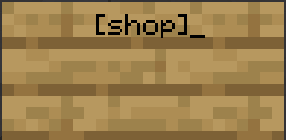
Chest shops are simple to make, the first step will always be to select the chest you want the shop to be at. Once you choose either a single chest or a double chest place the sign anywhere on the front, back, or sides where you would like players to interact with the shop.
What goes on the sign?
To create a chest shop start by typing [shop] on the first line of the sign.
Making your chest shop!
1. Once you create the sign, the chest shop menu should look like this:The sign will automatically register you as the owner, and only you will be allowed to edit the contents and prices from here on.
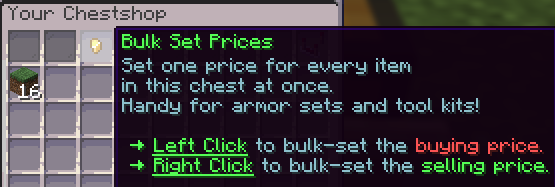
2. Left click to set a buying price for the item // Right click to set a selling price for the item. Place the item(s) you wish to sell or buy inside the chest, right click on the sign for the menu for the gui to pop up as shown below.
3. Once you select whether you wish to buy or sell, type in the price you wish to set ➔ and then click the paper to move on to the next menu.
Ex: sell or buy for $100 and then click the paper
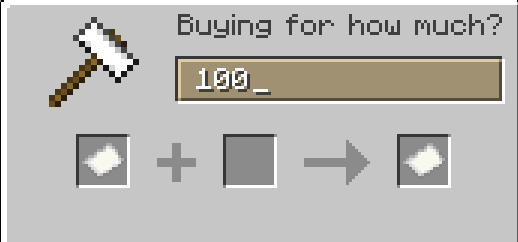
Ex: $100 for 1 stick
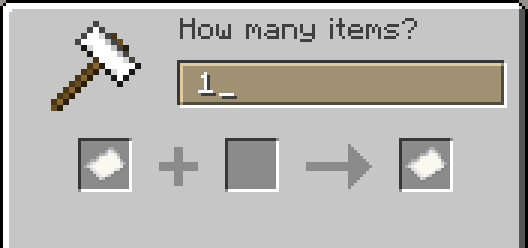
Please ensure to restock, or remove items as necessary so your chest does not get overfilled or empty. Breaking the sign will delete the shop attached to the chest.
Things You Need to Know
Bulk pricing
There is a possibility for your chestshop to bulkbuy/sell multiple items in a chest. This is great for setting up chestshops for tomb armor for example. Left click to set a price for buying sets of items.Right click to set a price for selling sets of items.
Shop Settings
At the top right of the chestshop GUI you will see a comparator. This comparator brings you to the chestshop settings. Below an explanation of what they do.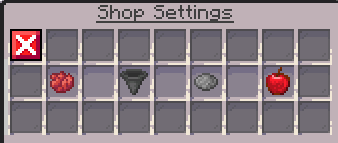
- Red Dye - Out of stock Items - Shows whether or not items that are out of stock are visible in your chestshop.
- Hopper - Hopper Settings - Controls if hoppers can transfer items in and out of a chest from your chestshop.
- Grey Dye - Entity display - Change the look of your chestshop with customizable entity displays! Look below for more information.
- Apple - Discounts - Run a sale for specific items or the entire chestshop.
Shop Statistics
Here you can view your transaction history, summaries and more. These statistics can be daily, weekly or monthly. They can also be filtered per item for you to get a grasp of the numbers and change your buy/sell strategy based on this knowledge. Time to turn yourself into the entrepreneur you always wanted to be!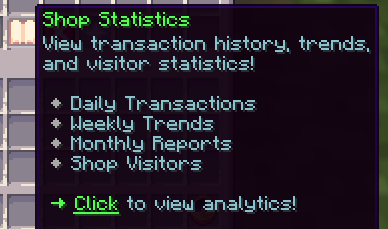
How many chest shops can I have?
Every player can make 4 chest shops, and store ranks unlock more. On Survival you can also earn extra shop slots. When you create a shop, chat tells you how many more you can make.Supplier and Remote shops
Want to sell from a chest that's tucked away in your storage room? Put a sign on that chest with [Supplier] on the first line and a name for it on the second line. Then place a sign anywhere nearby with [Remote] on the first line and the same name on the second line. The Remote sign links to your Supplier chest, so players can shop from the front of your shop while the stock stays in the back. The Supplier shop must be within 10 blocks of the Remote sign for every chest shop you're allowed to own (40 blocks with the default 4 shops), and a Supplier shop counts toward your shop limit.Chest Shop Mastery
Chest shop Mastery can reward you cosmetic chests shop entities, enabled in the shop settings (grey dye). Unique chestshop buyers/sellers and the amount of items sold contribute to your chestshop mastery.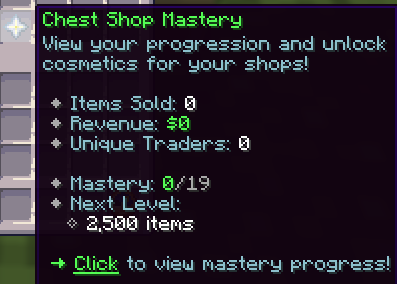
Chestshop Entities
Below is a list of all entities and how to acquire them. Some entities have special capabilities. For instance the entity can be a baby, can wear certain armor, can glow, be a different type of said entity, ... Lots of fun choices!- Masteries
- Chicken Shop - Chest Shop Mastery Level 1
- Cow Shop - Chest Shop Mastery Level 2
- Pig Shop - Chest Shop Mastery Level 3
- Sheep Shop - Chest Shop Mastery Level 4
- Cat Shop - Chest Shop Mastery Level 5
- Wolf Shop - Chest Shop Mastery Level 6
- Fox Shop - Chest Shop Mastery Level 7
- Rabbit Shop - Chest Shop Mastery Level 8
- Panda Shop - Chest Shop Mastery Level 9
- Villager Shop - Chest Shop Mastery Level 10
- Iron Golem Shop - Chest Shop Mastery Level 11
- Snow Golem Shop - Chest Shop Mastery Level 12
- Allay Shop - Chest Shop Mastery Level 13
- Axolotl Shop - Chest Shop Mastery Level 14
- Bee Shop - Chest Shop Mastery Level 15
- Parrot Shop - Chest Shop Mastery Level 16
- Enderman Shop - Chest Shop Mastery Level 17
- Wither Skeleton Shop - Chest Shop Mastery Level 18
- Blaze Shop - Chest Shop Mastery Level 19
- Acquired by vouchers
- Armadillo Shop
- Bat Shop
- Bogged Shop
- Breeze Shop
- Camel Husk Shop
- Cave Spider Shop
- Cod Shop
- Copper Golem Shop
- Creaking Shop
- Creeper Shop
- Dolphin Shop
- Drowned Shop
- Endermite Shop
- Evoker Shop
- Frog Shop
- Glow Squid Shop
- Goat Shop
- Guardian Shop
- Husk Shop
- Llama Shop
- Magma Cube Shop
- Mooshroom Shop
- Nautilus Shop
- Ocelot Shop
- Parched Shop
- Phantom Shop
- Piglin Shop
- Piglin Brute Shop
- Pillager Shop
- Pufferfish Shop
- Salmon Shop
- Shulker Shop
- Silverfish Shop
- Skeleton Shop
- Slime Shop
- Spider Shop
- Squid Shop
- Stray Shop
- Strider Shop
- Tadpole Shop
- Trader Llama Shop
- Tropical Fish Shop
- Turtle Shop
- Vex Shop
- Villager Shop
- Vindicator Shop
- Wandering Trader Shop
- Warden Shop
- Witch Shop
- Wither Shop
- Zombie Shop
- Zombie Nautilus Shop
- Zombie Villager Shop
- Equipment
- Leather
- Chainmail
- Iron
- Gold
- Diamond
- Netherite
- Glow
- Aqua
- Blue
- Green
- Red
- White
- Yellow
- Particle Effects
- Dragon Breath
- Enchant
- Portal
- Sculk Soul
- Totem
If you find that you need more help feel free to reach out on our Discord by making a ticket or speak with a staff member in game. We are here to help!
Chest Shop FAQ
How do I make a chest shop on Complex Gaming?
Put a sign on the front, back or side of a chest, trapped chest or barrel and type [shop] on the first line. The shop menu opens right away so you can set your items and prices, and only you can edit the shop.
Which Complex Gaming servers have chest shops?
Chest shops work on Survival, Skyblock and Prison. Join at hub.mc-complex.com on Java, or on Bedrock with port 19132.
How many chest shops can I have?
Every player can own 4 chest shops, and store ranks raise that limit. On Survival you can also earn extra shop slots, and chat tells you how many more shops you can make each time you create one.
What is the difference between a buying and selling price?
A buying price (left click) is what your shop pays players who sell that item to you. A selling price (right click) is what players pay to buy that item from your chest.
How do Supplier and Remote chest shops work?
Put a sign with [Supplier] on the first line and a name on the second line on your stock chest, then place a sign with [Remote] and the same name nearby for players to shop from. The Supplier must be within 10 blocks of the Remote sign for every shop you're allowed to own (40 blocks with the default 4 shops), and it counts toward your shop limit.
How do I remove a chest shop?
Break the shop's sign or its chest to delete the shop. Only the owner can break it, plus players who have shop chest permission on that claim, island or plot.
Server overview: Complex Gaming Java & Bedrock Server: IP and game modes
Related guides: Survival Server Guide | Skyblock Server Guide | Prison Server Guide
Related guides: Survival Server Guide | Skyblock Server Guide | Prison Server Guide
Skyblock Guides
Prison Guides
Factions Guides
Survival Guides
Minecraft Tips & Guides
Complex Gaming Network Information
Complex Gaming Partner Guides
Complex Gaming
Check out our quick links for fast access to important locations on the forums!
Support
Need assistance with purchases, or help in general?