
 Vanilla
 Pixelmon
 Cobblemon
- Home
- Wiki
- Complex Gaming Server Guides
- Complex Gaming Skyblock Server Guide: Islands, Runes, Island Top
You are using an out of date browser. It may not display this or other websites correctly.
You should upgrade or use an alternative browser.
You should upgrade or use an alternative browser.
Complex Gaming Skyblock Server Guide: Islands, Runes, Island Top
- Created by benj on
- 3228 views
Complex Gaming Skyblock Server Guide
How to get started on the Complex Gaming Minecraft Skyblock server
Complex Gaming Skyblock is a seasonal Minecraft Skyblock server where you build and grow your island, unlock island levels and minions, apply custom runes to your gear, grind the Pharaoh's Tomb, and compete with up to 10 island members for the #1 spot on Island Top. Join at skyblock.mc-complex.com on Minecraft Java Edition (1.12.2 through the latest release) or Bedrock Edition. Skyblock is free to play.
Server IP: skyblock.mc-complex.com
Versions: Java 1.12.2 to latest, Bedrock supported
Island Top: monthly competition, up to $500 GC in prizes
Features: island levels up to 50, island upgrades, minions with moods, diets and refinement, Tomb Expeditions, Rookies League, sell portals, dynamic economy, runes, Pharaoh's Tomb, Pharaoh's Realm, dungeons, clue scrolls, Time Traveler, seasonal resets
Store: https://store.mc-complex.com/
Discord: https://discord.gg/ComplexVanilla
Last updated: September 2026, Skyblock Season 7
Welcome to Skyblock! Starting fresh on a new server can seem daunting, but don't worry. This guide will walk you through everything you need to know to start your journey on Complex Skyblock.
Skyblock Starter Tips
Below is a list of the most commonly used commands on Complex Skyblock.
These essentials cover everything you need to start your journey.
How to get started on the Complex Gaming Minecraft Skyblock server
Complex Gaming Skyblock is a seasonal Minecraft Skyblock server where you build and grow your island, unlock island levels and minions, apply custom runes to your gear, grind the Pharaoh's Tomb, and compete with up to 10 island members for the #1 spot on Island Top. Join at skyblock.mc-complex.com on Minecraft Java Edition (1.12.2 through the latest release) or Bedrock Edition. Skyblock is free to play.
Server IP: skyblock.mc-complex.com
Versions: Java 1.12.2 to latest, Bedrock supported
Island Top: monthly competition, up to $500 GC in prizes
Features: island levels up to 50, island upgrades, minions with moods, diets and refinement, Tomb Expeditions, Rookies League, sell portals, dynamic economy, runes, Pharaoh's Tomb, Pharaoh's Realm, dungeons, clue scrolls, Time Traveler, seasonal resets
Store: https://store.mc-complex.com/
Discord: https://discord.gg/ComplexVanilla
Last updated: September 2026, Skyblock Season 7
Welcome to Skyblock! Starting fresh on a new server can seem daunting, but don't worry. This guide will walk you through everything you need to know to start your journey on Complex Skyblock.
Skyblock Starter Tips
Below is a list of the most commonly used commands on Complex Skyblock.
These essentials cover everything you need to start your journey.
| /is | Lets you create and warp to an island. |
| /is invite <username> | Lets you invite another player to your island. |
| /tpa <username> | Sends teleport request to a specific player. |
| /pwarp | Teleports you to a selected player warp. |
| /pay <username> <amount> | Sends a player the amount of money specified. |
| /shop | Opens the Skyblock shop, which uses in-game money. |
| /sell | Allows you to sell items from your hand to the Skyblock shop! |
| /trade <username> | Sends a trade request to a player in the same zone. |
| /ah | Opens the auction house. |
| /ah sell <price> | Prompts you to sell the item in your hand for the price you entered. |
| /ah collect | Collects items you won or bought on the auction house! |
| /warp quests | A place to earn free money, spawners, and more! |
| /vote | Prompts you to vote for the server. As a reward, you receive a vote key! |
| /resourcepack | Downloads the server resource pack for Skyblock's custom items! |
| /ignore <username> | Hides selected player's messages from your chat. |
| /discord | Provides a link to the discord for Complex Gaming's Vanilla Servers! |
| /guide | Forgot something? Type this command in chat and the link to this guide will pop up! |
| /cf | Shows all available coinflips you can take. |
| /cf <amount> | Creates a coinflip for the amount of IGM or GC you choose. |
| /cf hand | Creates a coinflip using the item in your hand. |
| /shoppers | Opens a small menu where you can buy a super hopper. Super hoppers can automatically transfer items to a distant chest or container. More down below! |
| /filter | Opens a menu where you can automatically filter or delete items. |
Spawn Warps
Spawn has several warps that take you to different parts of the game.
Here is every spawn warp and what it does:
Spawn has several warps that take you to different parts of the game.
Here is every spawn warp and what it does:
| /warp quests | Brings you to the quest giver. Quests are a leaderboard category and give various rewards. |
| /warp blacksmith | Brings you to the blacksmith. Here you can repair and mend your tools. |
| /warp cosmetics | Brings you to an NPC where you can get cosmetics using mystery dust. |
| /warp dailies | Brings you to an NPC where you can collect your free daily gifts. |
| /warp dungeon | Brings you to the dungeon entrance. Here you can earn dungeon coins by slaying monsters and defeating the boss. |
| /warp infuser | Brings you to an NPC where you can see every rune's description and buy tomes with experience. |
| /warp istop | Shows the progress of the top 10 islands on Island Top. |
| /warp pvp | Brings you to the PvP warzone. PvP is enabled here. |
| /warp resetvault | Brings you to the Reset Vault, which opens when a Skyblock reset is coming up. |
| /warp timetraveler | Brings you to the Time Traveler, a twice-weekly auction for older seasonal items. |
| /warp tomb | Brings you to the entrance of the Pharaoh's Tomb. Here you can earn rewards, mostly gold shards, by defeating mobs. |
| /warp tutorial | Brings you to our tutorial NPC. |
Free Resources
You can get free rewards with any of the commands below.
Each has its own cooldown, so check them regularly so you don't miss out.
Note: Commands marked with (!) can be used by players without a rank!
You can get free rewards with any of the commands below.
Each has its own cooldown, so check them regularly so you don't miss out.
Note: Commands marked with (!) can be used by players without a rank!
| /dailies (!) | Gives you money & experience pouches and mystery dust. Having a rank gives you more rewards. (18h cooldown) |
| /votes (!) | Click the link to open our voting sites. Every vote gives you a free vote key. (24h cooldown) |
| /voteparty (!) | If you've voted, you get a free vote key every 500 votes, with a rare chance of an Anubis, Horus or Ra key instead. |
| /freescrolls | Free clue scrolls for Scribe rank and above. Higher ranks get more and better clue scrolls. (1-7 day cooldown) |
| /freetomes | Free rune tomes for Soldier rank and above. (3 day cooldown) |
| /kits (!) | Sets of gear that get better when you rank up. |
| /jobs (!) | Earn free money from the job you've selected. |
Creating and Managing Your Island
Creating an Island
To create an island on Complex Skyblock, type /is. A menu will pop up showing an emerald block. Click the first emerald block to create your island.
When you create your island, you also choose the experience you want: Competitive or Casual. Competitive islands are built to compete for Island Top, with higher upgrade prices and bigger limits. Casual islands have cheaper upgrades for a relaxed, solo friendly experience. A Competitive island can be converted to Casual once, but the change is permanent and Casual islands cannot be converted to Competitive. Compare the full upgrade prices for both in the Island Upgrades section below.
Then choose one of the two island layouts below. Once it's created, a confirmation message will appear in chat.
Note: To prevent lag, islands that are inactive for 6+ months are automatically wiped.
Creating an Island
To create an island on Complex Skyblock, type /is. A menu will pop up showing an emerald block. Click the first emerald block to create your island.
When you create your island, you also choose the experience you want: Competitive or Casual. Competitive islands are built to compete for Island Top, with higher upgrade prices and bigger limits. Casual islands have cheaper upgrades for a relaxed, solo friendly experience. A Competitive island can be converted to Casual once, but the change is permanent and Casual islands cannot be converted to Competitive. Compare the full upgrade prices for both in the Island Upgrades section below.
Then choose one of the two island layouts below. Once it's created, a confirmation message will appear in chat.
Note: To prevent lag, islands that are inactive for 6+ months are automatically wiped.
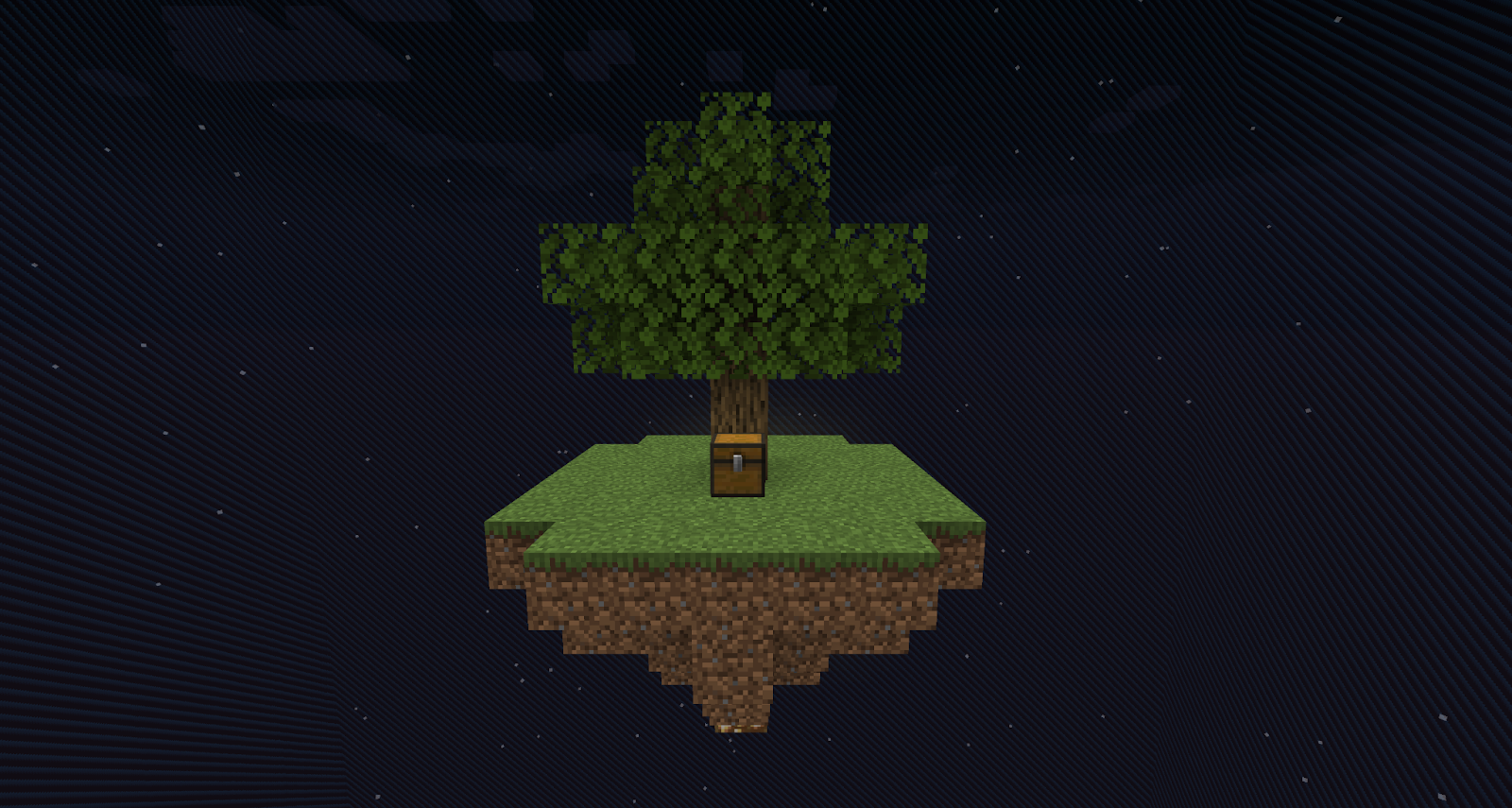
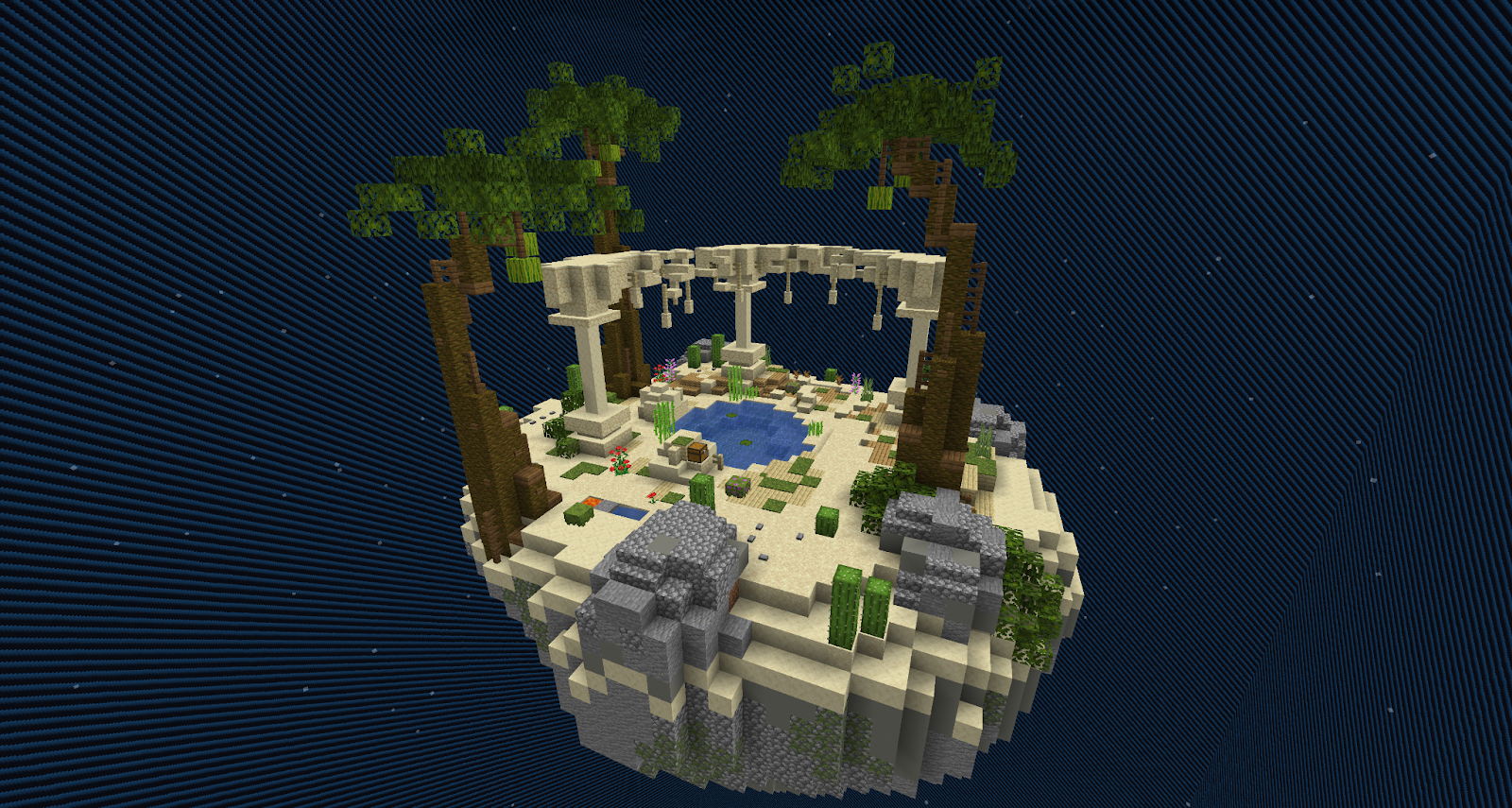
Option 1: Classic Island | Option 2: Oasis Island |
A good starting island if you want something easy to clear so you can build your own platform. | A good choice if you want plenty of space to work with from the start. |
| 
|
Navigating the /island GUI
Once you've made your island, type /is to open the Island menu, which shows your islands. Left-click to teleport to your island, or right-click to manage it.
The Island Manage Menu has the following options (left to right):
- Island Ranks - View/manage ranks inside your island. You can create new ranks if the default 6 aren't enough.
- Island Members - View/manage island members. You can set custom permissions and withdrawal limits per player, and more.
- Island Upgrades- View/purchase island upgrades. Open the spoilers below to see every upgrade and its price:
-
- Island Size
- Level 1: 100x100 (Default - Free)
- Level 2: 150x150 (Island Level 3 - $50M IGM)
- Level 3: 200x200 (Island Level 15 - $100M IGM)
- Level 4: 250x250 (Island Level 20 - $1B IGM)
- Level 5: 300x300 (Island Level 24 - $5B IGM)
- Island Member Size
- Level 1: 5 members (Default - Free)
- Level 2: 10 members (Default - $250M IGM)
- Island Warp Limit
- Level 1: 3 Warps (Default - Free)
- Level 2: 5 Warps (Default - $50M IGM)
- Level 3: 8 Warps (Island Level 8 - $100M IGM)
- Level 4: 10 Warps (Island Level 8 - $150M IGM)
- Island Public Warps Limit
- Level 1: 1 Public Warp (Default - Free)
- Level 2: 2 Public Warps (Island Level 7 - $500M IGM)
- Level 3: 3 Public Warps (Island Level 7 - $1B IGM)
- Spawner Limit
- Level 1: 50 spawners (Default - Free)
- Level 2: 75 spawners (Island Level 9 - $50M IGM)
- Level 3: 100 spawners (Island Level 13 - $150M IGM)
- Level 4: 150 spawners (Island Level 16 - $500M IGM)
- Level 5: 200 spawners (Island Level 21 - $1B IGM)
- Level 6: 250 spawners (Island Level 23 - $3B IGM)
- Minion Limit
- Level 1: 5 Minions (Default - Free)
- Level 2: 7 Minions (Island Level 6 - $5M IGM)
- Level 3: 10 Minions (Island Level 11 - $25M IGM)
- Level 4: 14 Minions (Island Level 13 - $250M IGM)
- Level 5: 18 Minions (Island Level 16 - $1B IGM)
- Level 6: 22 Minions (Island Level 18 - $2.5B IGM)
- Level 7: 25 Minions (Island Level 21 - $5B IGM)
- Minion Recruitment Slot Limit
- Level 1: 0 slots (Default - Free)
- Level 2: 1 Slot (Island Level 8 - $10M IGM)
- Level 3: 2 Slots (Island Level 14 - $25M IGM)
- Level 4: 3 Slots (Island Level 17 - $100M IGM)
- Level 5: 4 Slots (Island Level 20 - $500M IGM)
- Level 6: 5 Slots (Island Level 23 - $1B IGM)
- Level 7: 6 Slots (Island Level 25 - $5B IGM)
- Level 8: 7 Slots (Island Level 25 - $10B IGM)
- Hopper Limit
- Level 1: 150 Hoppers (Default - Free)
- Level 2: 250 Hoppers (Island Level 7 - $25M IGM)
- Level 3: 300 Hoppers (Island Level 12 - $100M IGM)
- Level 4: 350 Hoppers (Island Level 24 - $250M IGM)
- Level 5: 400 Hoppers (Island Level 24 - $500M IGM)
- Elevator Limit
- Level 1: 1 Elevator (Default - Free)
- Level 2: 2 Elevators (Default - $15M)
- Level 3: 3 Elevators (Default - $25M)
- Level 4: 4 Elevators (Default - $35M)
- Level 5: 6 Elevators (Default - $50M)
- Level 6: 8 Elevators (Default - $60M)
- Level 7: 12 Elevators (Default - $75M)
- Level 8: 16 Elevators (Default - $100M)
- Sell Portal Upgrade
- Level 1: 10% (Default - Free)
- Level 2: 12% (Island Level 6 - $50M IGM)
- Level 3: 14% (Island Level 11 - $100M IGM)
- Level 4: 16% (Island Level 15 - $500M IGM)
- Level 5: 18% (Island Level 20 - $1B IGM)
- Level 6: 20% (Island Level 25 - $5B IGM)
- Gold Shard Bank Limit
- Level 1: 500 Shards (Default - Free)
- Level 2: 2,500 Shards (Island Level 8 - $50M IGM)
- Level 3: 5,000 Shards (Island Level 12 - $100M IGM)
- Level 4: 10,000 Shards (Island Level 14 - $500M IGM)
- Level 5: 15,000 Shards (Island Level 17 - $1B IGM)
- Level 6: 25,000 Shards (Island Level 19 - $5B IGM)
- Money Bank
- Level 1: $500M IGM (Default - Free)
- Level 2: $1B IGM (Island Level 5 - $50M)
- Level 3: $2.5B IGM (Island Level 10 - $250M)
- Level 4: $5B IGM (Island Level 15 - $500M)
- Level 5: $10B IGM (Island Level 19 - $1B)
- Level 6: $15B IGM (Island Level 22 - $2.5B)
- Level 7: $30B IGM (Island Level 25 - $5B)
- Vault Slots Limit
- Level 1: 9 Slots (Default - Free)
- Level 2: 18 Slots (Island Level 5 - $5M IGM)
- Level 3: 27 Slots (Island Level 5 - $10M IGM)
- Level 4: 36 Slots (Island Level 10 - $25M IGM)
- Level 5: 45 Slots (Island Level 10 - $30M IGM)
- Level 6: 54 Slots (Island Level 15 - $50M IGM)
- Level 7: 63 Slots (Island Level 15 - $100M IGM)
- Level 8: 72 Slots (Island Level 22 - $200M IGM)
- Level 9: 81 Slot (Island Level 22 - $300M IGM)
- Level 10: 90 Slots (Island Level 23 - $500M IGM)
- Pharaoh's Realm(Please be aware you still need to set up a portal after buying this upgrade.)
- Level 1: Unlocked (Island Level 15 - $500M IGM)
- Pharaoh's Realm Resistance
- Level 1: 0% Slower (Default - Free)
- Level 2: 5% Slower (Island Level 17 - $50M IGM)
- Level 3: 10% Slower (Island Level 19 - $150M IGM)
- Level 4: 15% Slower (Island Level 21 - $300M IGM)
- Level 5: 20% Slower (Island Level 23 - $600M IGM)
- Level 6: 25% Slower (Island Level 23 - $1B IGM)
- End(Please be aware you still need to set up a portal after buying this upgrade.)
- Level 1: Unlocked (Island Level 20 - $1B IGM)
- Overworld Ore Generator
- Level 1: Iron, coal & stone (Default - Free)
- Level 2: More iron & coal (Island Level 2 - $5M IGM)
- Level 3: Addition of gold (Island Level 7 - $10M IGM)
- Level 4: Addition of redstone (Island Level 12 - $25M IGM)
- Level 5: Addition of lapis (Island Level 14 - $50M IGM)
- Level 6: Addition of diamond and the removal of stone (Island Level 17 - $75M IGM)
- Level 7: Addition of emerald (Island Level 19 - $250M IGM)
- End Ore Generator
- Level 1: Purpur pillar, purpur block, endstone bricks and endstone (Default - Free)
- Level 2: Addition of diamond blocks (Island Level 25 - $200M IGM)
- Level 3: Addition of emerald blocks (Island Level 25 - $400M IGM)
- Level 4: Higher chances for ore blocks (Island Level 25 - $600M IGM)
- Level 5: Higher chances for ore blocks (Island Level 25 - $800M IGM)
- Level 6: Higher chances for ore blocks & removal of purpur blocks and pillars (Island Level 25 - $1B IGM)
- Level 7: Higher chances for ore blocks (Island Level 25 - $1.2B IGM)
- Level 8: Addition of netherite blocks, slightly lower chances for other ore blocks (Island Level 25 - $1.5B IGM)
- Sapling Limit
- Level 1: 5 Saplings (Default - Free)
- Level 2: 10 Saplings (Default - $5M IGM)
- Level 3: 15 Saplings (Island Level 5 - $10M IGM)
- Level 4: 20 Saplings (Island Level 5 - $25M IGM)
- Level 5: 25 Saplings (Island Level 10 - $50M IGM)
- Level 6: 30 Saplings (Island Level 10 - $100M IGM)
- Level 7: 40 Saplings (Island Level 14 - $200M IGM)
- Level 8: 50 Saplings (Island Level 18 - $300M IGM)
- Sapling Drop Rate
- Level 1: 2.5% (Default - Free)
- Level 2: 2.75% (Default - $250M IGM)
- Level 3: 3.0% (Island Level 10 - $500M IGM)
- Level 4: 3.5% (Island Level 16 - $750M IGM)
- Mob Death XP Boost
- Level 1: 1.0x (Default - Free)
- Level 2: 1.10x (Default - $25M IGM)
- Level 3: 1.20x (Island Level 4 - $100M IGM)
- Level 4: 1.30x (Island Level 11 - $500M IGM)
- Level 5: 1.40x (Island Level 18 - $1B IGM)
- Level 6: 1.50x (Island Level 23 - $5B IGM)
- Mission Reroll
- Level 1: Unlocked (Default - $50M IGM)
- Island Size
-
- Island Size
- Level 1: 100x100 (Default - Free)
- Level 2: 150x150 (Island Level 3 - $25M IGM)
- Level 3: 200x200 (Island Level 15 - $50M IGM)
- Level 4: 250x250 (Island Level 20 - $500M IGM)
- Level 5: 300x300 (Island Level 24 - $2.5B IGM)
- Island Member Size
- Level 1: 6 members (Default - Free)
- Level 2: 8 members (Default - $50M IGM)
- Island Warp Limit
- Level 1: 3 Warps (Default - Free)
- Level 2: 5 Warps (Default - $25M IGM)
- Level 3: 8 Warps (Island Level 8 - $50M IGM)
- Level 4: 10 Warps (Island Level 8 - $75M IGM)
- Island Public Warps Limit
- Level 1: 1 Public Warp (Default - Free)
- Level 2: 2 Public Warps (Island Level 7 - $250M IGM)
- Level 3: 3 Public Warps (Island Level 7 - $500M IGM)
- Spawner Limit
- Level 1: 50 spawners (Default - Free)
- Level 2: 75 spawners (Island Level 9 - $25M IGM)
- Level 3: 100 spawners (Island Level 13 - $75M IGM)
- Level 4: 150 spawners (Island Level 16 - $250M IGM)
- Level 5: 200 spawners (Island Level 21 - $500M IGM)
- Level 6: 250 spawners (Island Level 23 - $1.5B IGM)
- Minion Limit
- Level 1: 3 Minions (Default - Free)
- Level 2: 4 Minions (Island Level 6 - $2.5M IGM)
- Level 3: 5 Minions (Island Level 11 - $12.5M IGM)
- Level 4: 6 Minions (Island Level 13 - $125M IGM)
- Level 5: 8 Minions (Island Level 16 - $500M IGM)
- Level 6: 10 Minions (Island Level 18 - $1.25B IGM)
- Level 7: 12 Minions (Island Level 21 - $2.5B IGM)
- Minion Recruitment Slot Limit
- Level 1: 0 slots (Default - Free)
- Level 2: 1 Slot (Island Level 8 - $5M IGM)
- Level 3: 2 Slots (Island Level 14 - $12.5M IGM)
- Level 4: 3 Slots (Island Level 17 - $50M IGM)
- Level 5: 4 Slots (Island Level 20 - $250M IGM)
- Level 6: 5 Slots (Island Level 23 - $500M IGM)
- Level 7: 6 Slots (Island Level 25 - $2.5B IGM)
- Level 8: 7 Slots (Island Level 25 - $5B IGM)
- Hopper Limit
- Level 1: 150 Hoppers (Default - Free)
- Level 2: 250 Hoppers (Island Level 7 - $12.5M IGM)
- Level 3: 300 Hoppers (Island Level 12 - $50M IGM)
- Level 4: 350 Hoppers (Island Level 24 - $125M IGM)
- Level 5: 400 Hoppers (Island Level 24 - $250M IGM)
- Level 6: 450 Hoppers (Island Level 24 - $500M IGM)
- Elevator Limit
- Level 1: 1 Elevator (Default - Free)
- Level 2: 2 Elevators (Default - $7.5M)
- Level 3: 3 Elevators (Default - $12.5M)
- Level 4: 4 Elevators (Default - $17.5M)
- Level 5: 6 Elevators (Default - $25M)
- Level 6: 8 Elevators (Default - $37.5M)
- Level 7: 12 Elevators (Default - $50M)
- Level 8: 16 Elevators (Default - $75M)
- Gold Shard Bank Limit
- Level 1: 500 Shards (Default - Free)
- Level 2: 2,500 Shards (Island Level 8 - $25M IGM)
- Level 3: 5,000 Shards (Island Level 12 - $50M IGM)
- Level 4: 10,000 Shards (Island Level 14 - $250M IGM)
- Level 5: 15,000 Shards (Island Level 17 - $500M IGM)
- Level 6: 25,000 Shards (Island Level 19 - $2.5B IGM)
- Money Bank
- Level 1: $25M IGM (Default - Free)
- Level 2: $100M IGM (Island Level 5 - $25M)
- Level 3: $250M IGM (Island Level 10 - $50M)
- Level 4: $500M IGM (Island Level 15 - $100M)
- Level 5: $1B IGM (Island Level 20 - $250M)
- Level 6: $2.5B IGM (Island Level 25 - $500M)
- Level 7: $5B IGM (Island Level 25 - $1B)
- Vault Slots Limit
- Level 1: 9 Slots (Default - Free)
- Level 2: 18 Slots (Island Level 5 - $2.5M IGM)
- Level 3: 27 Slots (Island Level 5 - $5M IGM)
- Level 4: 36 Slots (Island Level 10 - $12.5M IGM)
- Level 5: 45 Slots (Island Level 10 - $15M IGM)
- Level 6: 54 Slots (Island Level 15 - $25M IGM)
- Level 7: 63 Slots (Island Level 15 - $50M IGM)
- Level 8: 72 Slots (Island Level 22 - $100M IGM)
- Level 9: 81 Slot (Island Level 22 - $150M IGM)
- Level 10: 90 Slots (Island Level 23 - $250M IGM)
- Pharaoh's Realm(Please be aware you still need to set up a portal after buying this upgrade.)
- Level 1: Unlocked (Island Level 10 - $100M IGM)
- Pharaoh's Realm Resistance
- Level 1: 0% Slower (Default - Free)
- Level 2: 5% Slower (Island Level 17 - $50M IGM)
- Level 3: 10% Slower (Island Level 19 - $150M IGM)
- Level 4: 15% Slower (Island Level 21 - $300M IGM)
- Level 5: 20% Slower (Island Level 23 - $600M IGM)
- Level 6: 25% Slower (Island Level 23 - $1B IGM)
- End(Please be aware you still need to set up a portal after buying this upgrade.)
- Level 1: Unlocked (Island Level 20 - $500M IGM)
- Overworld Ore Generator
- Level 1: Iron, coal & stone (Default - Free)
- Level 2: More iron & coal (Island Level 2 - $2.5M IGM)
- Level 3: Addition of gold (Island Level 7 - $5M IGM)
- Level 4: Addition of redstone (Island Level 12 - $12.5M IGM)
- Level 5: Addition of lapis (Island Level 14 - $25M IGM)
- Level 6: Addition of diamond and the removal of stone (Island Level 17 - $37.5M IGM)
- Level 7: Addition of emerald (Island Level 19 - $125M IGM)
- End Ore Generator
- Level 1: Purpur pillar, purpur block, endstone bricks and endstone (Default - Free)
- Level 2: Addition of diamond blocks (Island Level 25 - $100M IGM)
- Level 3: Addition of emerald blocks (Island Level 25 - $200M IGM)
- Level 4: Higher chances for ore blocks (Island Level 25 - $300M IGM)
- Level 5: Higher chances for ore blocks (Island Level 25 - $400M IGM)
- Level 6: Higher chances for ore blocks & removal of purpur blocks and pillars (Island Level 25 - $500M IGM)
- Level 7: Higher chances for ore blocks (Island Level 25 - $600M IGM)
- Level 8: Addition of netherite blocks, slightly lower chances for other ore blocks (Island Level 25 - $700M IGM)
- Sapling Limit
- Level 1: 5 Saplings (Default - Free)
- Level 2: 10 Saplings (Default - $2.5M IGM)
- Level 3: 15 Saplings (Island Level 5 - $5M IGM)
- Level 4: 20 Saplings (Island Level 5 - $12.5M IGM)
- Level 5: 25 Saplings (Island Level 10 - $25M IGM)
- Level 6: 30 Saplings (Island Level 10 - $50M IGM)
- Level 7: 40 Saplings (Island Level 14 - $100M IGM)
- Level 8: 50 Saplings (Island Level 18 - $150M IGM)
- Sapling Drop Rate
- Level 1: 2.5% (Default - Free)
- Level 2: 2.75% (Default - $125M IGM)
- Level 3: 3.0% (Island Level 10 - $250M IGM)
- Level 4: 3.5% (Island Level 16 - $375M IGM)
- Mob Death XP Boost
- Level 1: 1.0x (Default - Free)
- Level 2: 1.10x (Default - $12.5M IGM)
- Level 3: 1.20x (Island Level 4 - $50M IGM)
- Level 4: 1.30x (Island Level 11 - $250M IGM)
- Level 5: 1.40x (Island Level 18 - $500M IGM)
- Level 6: 1.50x (Island Level 23 - $2.5B IGM)
- Mission Reroll
- Level 1: Unlocked (Default - $50M IGM)
- Island Size
-
- Island Settings- View/change island settings
- World settings (mob/animal spawning, rain, explosions, fire spread, border visibility, biome and island time (plus feature))
- Gameplay (pvp enabled/disabled)
- Access (whitelisted/locked island)
- Appearance (change your island's name, colors and icon, plus your team chat colors)
- Island Permissions - View/edit island permissions.
- Island Bank - View/manage the bank, where you can store and withdraw in-game money and gold shards.
- Island Warps - View/create island warps. Click the emerald block to start creating a warp, then follow the instructions in chat.
- Island Vault - View/edit your island vault.
- Island Logs - View island logs. There are logs of members, ranks, upgrades, settings, warps, whitelists, vault and a general log.
- Island Recruitment - View/change recruitment status. Used to review applications to your island.
- Island Browse - Opens the /pwarp menu, where you can visit all kinds of player warps.
- Island Leaderboard - View the Island Top leaderboard and track changes to adapt your strategy.
- Island Whitelist - View/manage whitelisted players. You can set separate whitelists for the Overworld and the End.
- Island Missions - View/start island missions and see the loot pool for completing them.
- Island Levels - View/unlock island levels, now up to level 50. Some levels cost in-game money, others unlock automatically.
- Island Minions- View/manage minions.
- Minion Recruitment - Buy recruitment slots in the island upgrades tab. Better upgrades mean better minion chances.
- Minions - Manage your minions by clicking on them. Check out the minion guide for more information!
- Island Milestones - View/collect island milestones, which are needed to level up your island.
- Delete/leave Island - Warning: Deleting your island is permanent! Staff cannot restore it.
New in Season 7
The biggest additions to Complex Skyblock this season
The biggest additions to Complex Skyblock this season
- Tutorial and Guide NPC: New players are walked through the basics by a guide NPC on their island, who stays as a quick management hub while you're new.
- Rookies League: New players are automatically grouped into small classes that compete during their first week, and the top 8 in each class earn starter rewards like in-game money, vote keys and runes, paid straight to their island bank.
- Island Levels up to 50: The island level cap is now 50, with more milestones in between so there's always a reward to work toward.
- Minion Essences: There are now 4 essence types, one for each minion type: Fish Oil (Fishing), Resin (Logging), Flux (Mining) and Mulch (Farming). Essences come from dungeons, and new Implants give your minions a small chance to drop them while working.
- Refinement Minions and Artisan Goods: Refinement Minions use essences to turn nearby minions' drops into Artisan Goods, worth 50% to 200% of their value for Island Top depending on your minions' moods and comfort.
- Minion Moods and Comfort: Minions now have daily moods that raise or lower their output. Comfort (0 to 100) depends on spacing, light, decor and variety, and a higher comfort reduces bad moods and boosts good ones.
- Chef Minions and Minion Diet: Chef Minions cook food for your other minions. Feeding minions improves their mood, and unfed minions simply stay neutral.
- New Minions: Logging and Fishing minions join the minion roster.
- Fertilizer: Fertilizer I to V gives your whole island a greenhouse-style crop boost for 1 hour, matching greenhouse levels 1 to 5. Get it from crates and Tomb drops.
- Tomb Expeditions: Solo wave-survival challenges inside the Pharaoh's Tomb that unlock deeper Tomb tiers. See the Pharaoh's Tomb section below.
- Daily PvP Events: Daily warzone events that reward Angelic Items and PvP Top points. They don't affect Island Top, so every type of player can compete.
- Time Traveler twice a week: The Time Traveler now shows up every Sunday and Wednesday.
- Quality of life: Claim all your dailies in one click, and use the [pwarp] chat tag to share a clickable link to your player warp.
Key Skyblock Features
Dynamic Economy
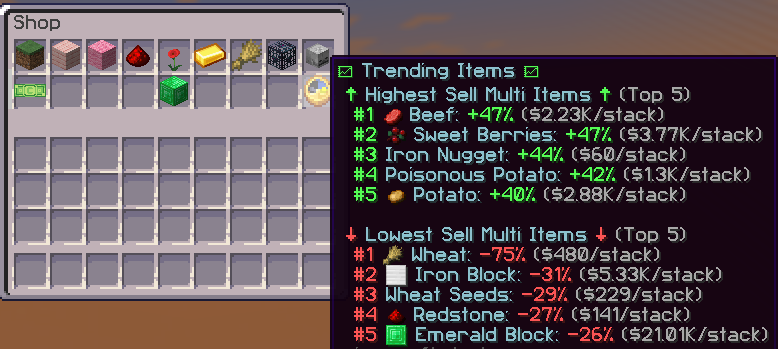
The Complex Skyblock shop uses a dynamic economy. The more an item is sold, the more its value decreases, and the less it's sold, the more its value increases. Think supply and demand.
(Ex. If you're selling potatoes and 50 other players are selling tons of potatoes too, the price drops. But if you switch to carrots while everyone else is still farming potatoes, carrots will likely be worth more, earning you more profit!)
Catch Up Discount
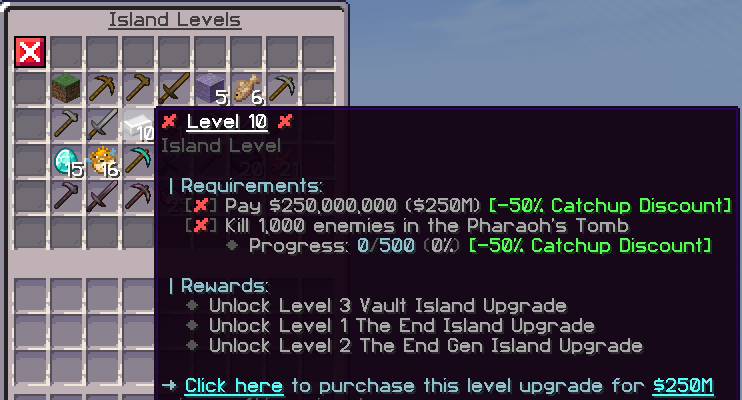
To keep gameplay fair, island levels and milestones have a "catch-up discount", which lets newer islands work toward milestones at a reduced cost.
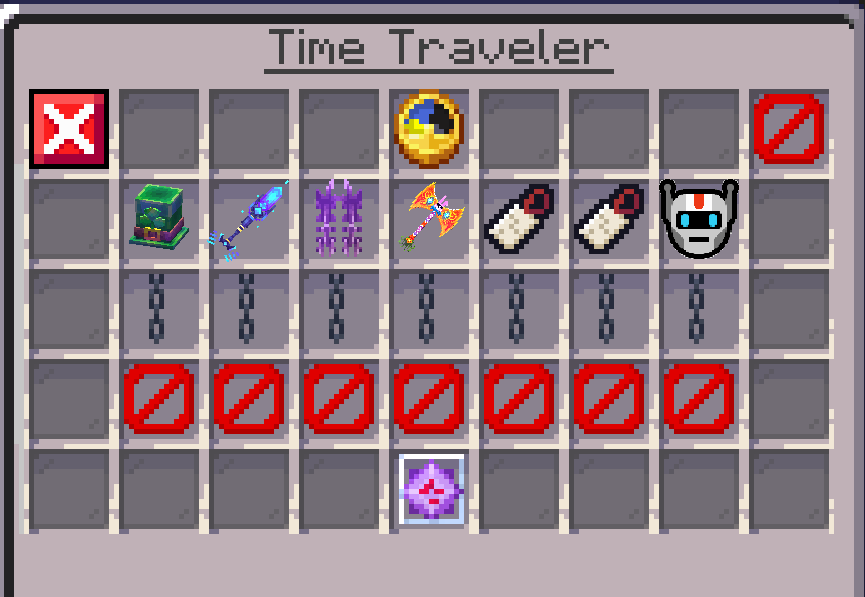
Time Traveler
The Time Traveler (/warp timetraveler) appears every Sunday and Wednesday, selling past seasonal crate items and tags. Once it appears, you can bid on items with GC for 1 day, and bids can NOT be seen by other players.
Note: Bids cannot be canceled, but they are refunded if you're outbid.
Infuser/Runes (/warp infuser)
Runes are Complex Skyblock's custom enchantments for tools, armor and weapons. You can view every rune at /warp infuser.
Dynamic Economy
The Complex Skyblock shop uses a dynamic economy. The more an item is sold, the more its value decreases, and the less it's sold, the more its value increases. Think supply and demand.
(Ex. If you're selling potatoes and 50 other players are selling tons of potatoes too, the price drops. But if you switch to carrots while everyone else is still farming potatoes, carrots will likely be worth more, earning you more profit!)
Catch Up Discount
To keep gameplay fair, island levels and milestones have a "catch-up discount", which lets newer islands work toward milestones at a reduced cost.
Time Traveler
The Time Traveler (/warp timetraveler) appears every Sunday and Wednesday, selling past seasonal crate items and tags. Once it appears, you can bid on items with GC for 1 day, and bids can NOT be seen by other players.
Note: Bids cannot be canceled, but they are refunded if you're outbid.
Infuser/Runes (/warp infuser)
Runes are Complex Skyblock's custom enchantments for tools, armor and weapons. You can view every rune at /warp infuser.
There are five rune types: common, rare, legendary, mythical and tomb runes. Apply a rune by dragging and dropping it onto a tool, armor piece or weapon. But be careful, it can fail and destroy your item! Each rune shows its success, fail and critical fail rates, and you can raise the success rate by adding lucky gems to the rune!
If you added a rune by accident or don't like it, use a cleansing wand to remove it. Note that the rune is destroyed and you won't get it back.
Rune tomes, lucky gems and cleansing wands are all bought with experience at /warp infuser. Rune tome costs:
- Common - Cost: 6,250 XP
- Rare - Cost: 25,000 XP
- Legendary - Cost: 62,500 XP
- Mythical - Cost: 125,000 XP
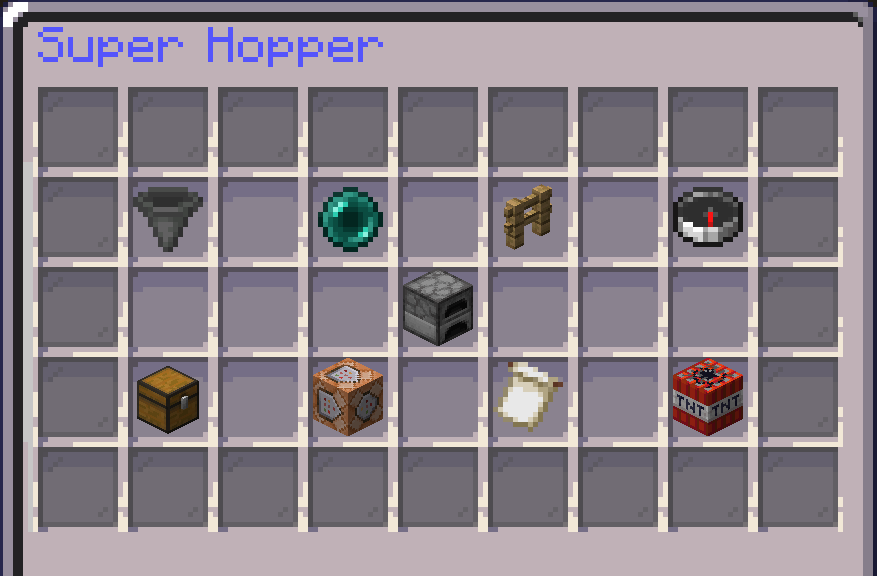
Super Hoppers (/shoppers)
Super hoppers look like normal hoppers, but you buy them from /shoppers and can upgrade them with more abilities. A super hopper can automatically transfer items to a distant chest or container, filter items, and move items faster than a normal hopper. To break one, shift + left-click it with a pickaxe.
Super Hopper Filters
To add a filter to a super hopper:
Link the super hopper to a chest or container within linking distance. If you're not sure of your link distance, check the compass in the top right.
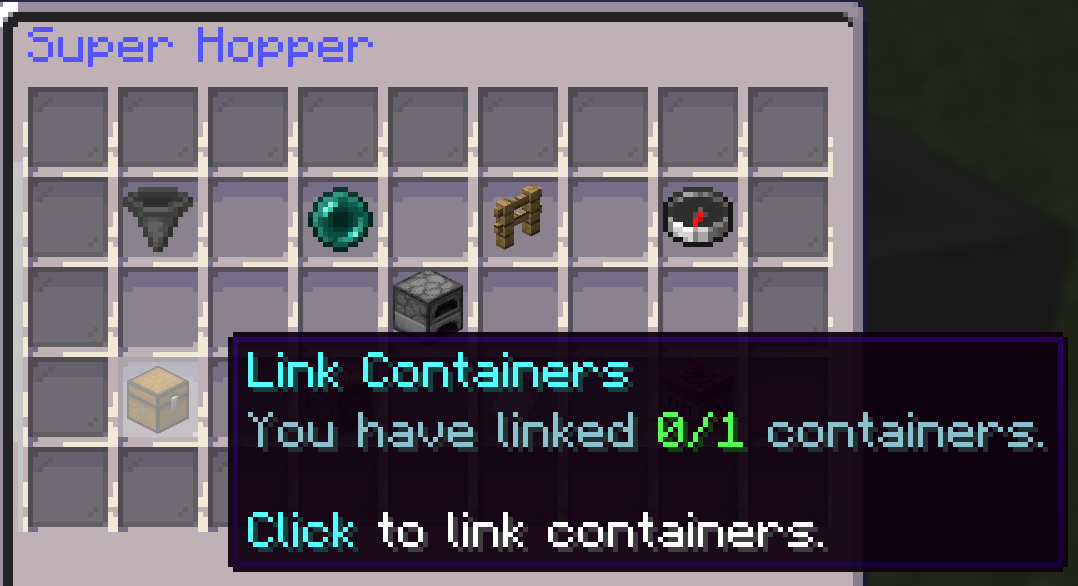
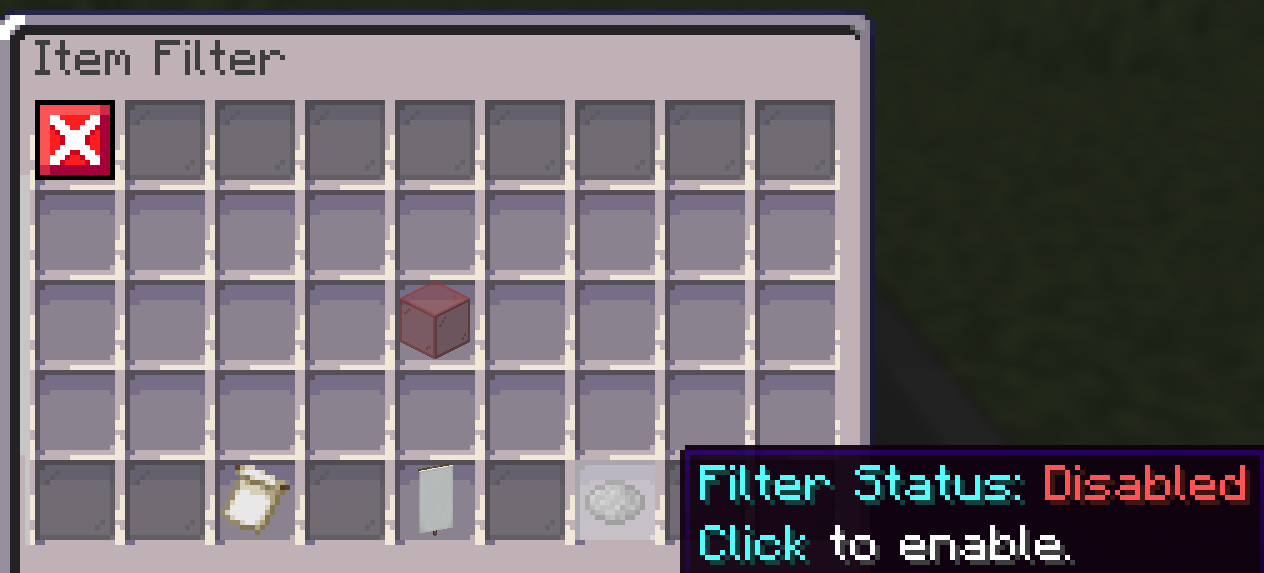
Next, click "manage links" (the command block icon). If the link worked, a chest will appear like in the image. Note: in the image, the filter status says "disabled", which means the filter will NOT work.
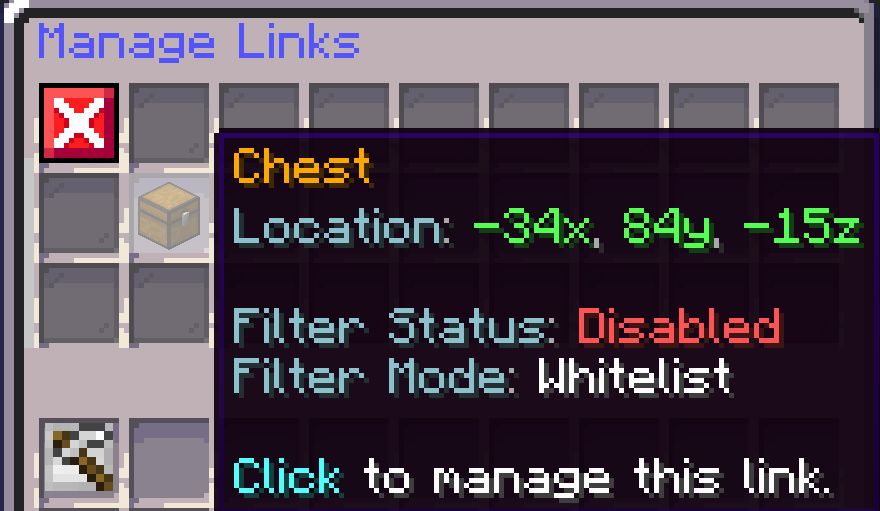
To fix this, click the chest from the previous image and look at the bottom right. The grey dye shows the filter status, which should say "enabled". Click it and make sure it's set the way you want.
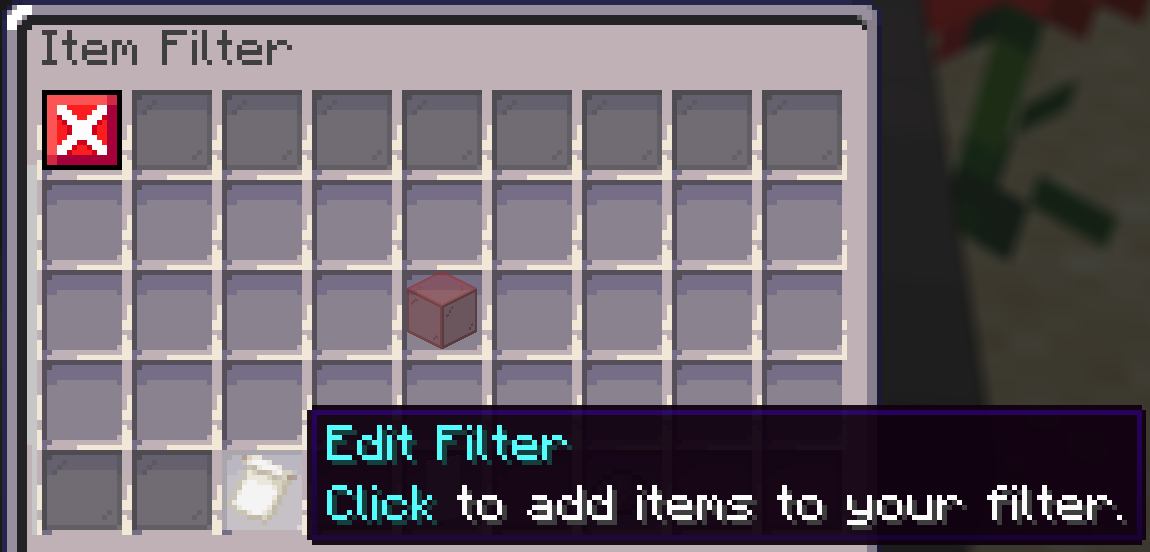
In the same menu, click the "edit filter" button on the bottom left to add items to the filter's whitelist. Only whitelisted items will go into the super hopper and be transferred.
Island Top
Island Top, often called "istop", is the Complex Skyblock competition where you team up with up to 10 island members and compete against other islands to earn the most island value. The goal is to reach #1 on istop!
Super hoppers look like normal hoppers, but you buy them from /shoppers and can upgrade them with more abilities. A super hopper can automatically transfer items to a distant chest or container, filter items, and move items faster than a normal hopper. To break one, shift + left-click it with a pickaxe.
Super Hopper Filters
To add a filter to a super hopper:
Link the super hopper to a chest or container within linking distance. If you're not sure of your link distance, check the compass in the top right.
Next, click "manage links" (the command block icon). If the link worked, a chest will appear like in the image. Note: in the image, the filter status says "disabled", which means the filter will NOT work.
To fix this, click the chest from the previous image and look at the bottom right. The grey dye shows the filter status, which should say "enabled". Click it and make sure it's set the way you want.
In the same menu, click the "edit filter" button on the bottom left to add items to the filter's whitelist. Only whitelisted items will go into the super hopper and be transferred.
Island Top
Island Top, often called "istop", is the Complex Skyblock competition where you team up with up to 10 island members and compete against other islands to earn the most island value. The goal is to reach #1 on istop!
Island Top resets at the start of each month, so you compete for four weeks before rewards are given out. The top islands can win up to $500 GC and more, split across island members.
Want to compete? You need to opt in to Island Top by reaching Island Level 5, then running /istop and clicking "Island Opt In" (the end portal frame).
| /istop | Shows the Island Top scoreboard. |
Sell Portals
Sell Portals are the ONLY way to earn Island Value for Island Top. Throw your items into your Sell Portal and they are converted into /istop value. Buy Sell Portals in /shop 7 (the last block, crying obsidian).
You can upgrade your Sell Portal in Island Upgrades to earn a higher percentage of value from items sold through it.
Note: Sell Portals CAN be picked back up after placing. Break one of the crying obsidian blocks and the Sell Portal returns to your inventory.
Leaderboard
The Leaderboard, often called "LB", is a weekly solo competition to have the most points by the end of the week. There are many categories, and the more you compete in, the more points you can earn!
Leaderboard
The Leaderboard, often called "LB", is a weekly solo competition to have the most points by the end of the week. There are many categories, and the more you compete in, the more points you can earn!
| /lb | Shows the leaderboard scoreboard. |
Pharaoh's Realm
Pharaoh's Realm is a realm reached through an Ancient Portal, which you build on your island after finding eight different Ancient Artifacts. Inside, you can earn even more money and resources. But be careful, using Pharaoh's Realm too much may cause the portal to break!
Pharaoh's Tomb (/warp tomb)
Pharaoh's Tomb is the Complex Skyblock PvE area, where hordes of mobs drop gold shards, tomes, spawners, boosters and more!
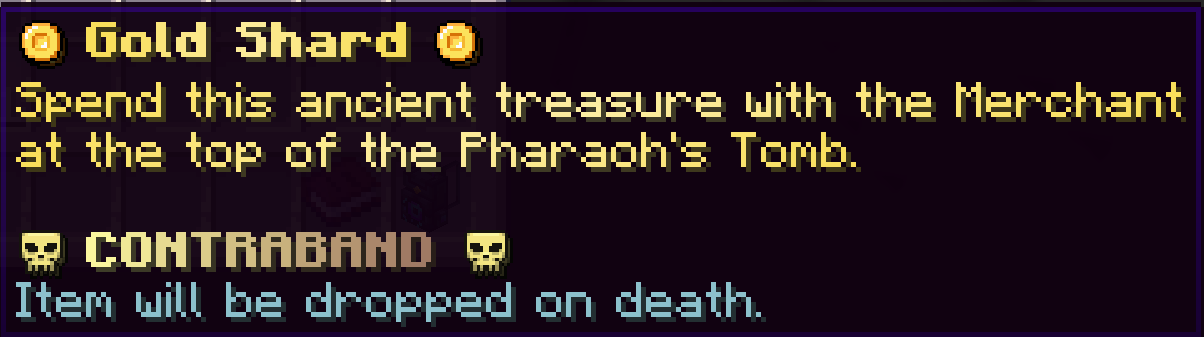
Some items, like gold shards and treasure keys, count as contraband. If you're killed by a player or mob, you keep your inventory except for contraband items. You can see whether an item is contraband by hovering over it, as shown below.
Note: Kills with a crossbow inside the Tomb have 40% worse drop odds than sword kills.
Tomb Expeditions
Tomb Expeditions are solo wave-survival arenas inside the Pharaoh's Tomb, each with its own mobs, abilities and weapons, and they get harder as you climb the ladder. Clearing expeditions is how you unlock deeper Tomb tiers: clear expeditions 1 to 5 to unlock Tier 2, and keep climbing to unlock Tier 3. Your first expedition is free and teaches you the basics, including your first backpack. After that, each expedition costs gold shards to enter, and you lose them if you fail the run. Every expedition gives a one-time reward along the way, like spawners, vote keys, rune tomes, boosters and an Angelic Backpack, and the top expeditions give Island Top benefits.
Chest Shops
To learn how to set up a chest shop, check out our Chest Shop Guide!
/Sunday
Every Sunday, players get special perks, including fewer votes needed for vote parties, no tax on /ah listings, faster milestone progress and increased experience drops.
Cosmetics
Cosmetics like banners, pets and gadgets are crafted with mystery dust. First craft a mystery crate, then open it to receive your cosmetics.
Pharaoh's Realm is a realm reached through an Ancient Portal, which you build on your island after finding eight different Ancient Artifacts. Inside, you can earn even more money and resources. But be careful, using Pharaoh's Realm too much may cause the portal to break!
Pharaoh's Tomb (/warp tomb)
Pharaoh's Tomb is the Complex Skyblock PvE area, where hordes of mobs drop gold shards, tomes, spawners, boosters and more!
Some items, like gold shards and treasure keys, count as contraband. If you're killed by a player or mob, you keep your inventory except for contraband items. You can see whether an item is contraband by hovering over it, as shown below.
Note: Kills with a crossbow inside the Tomb have 40% worse drop odds than sword kills.
Tomb Expeditions
Tomb Expeditions are solo wave-survival arenas inside the Pharaoh's Tomb, each with its own mobs, abilities and weapons, and they get harder as you climb the ladder. Clearing expeditions is how you unlock deeper Tomb tiers: clear expeditions 1 to 5 to unlock Tier 2, and keep climbing to unlock Tier 3. Your first expedition is free and teaches you the basics, including your first backpack. After that, each expedition costs gold shards to enter, and you lose them if you fail the run. Every expedition gives a one-time reward along the way, like spawners, vote keys, rune tomes, boosters and an Angelic Backpack, and the top expeditions give Island Top benefits.
Chest Shops
To learn how to set up a chest shop, check out our Chest Shop Guide!
/Sunday
Every Sunday, players get special perks, including fewer votes needed for vote parties, no tax on /ah listings, faster milestone progress and increased experience drops.
Cosmetics
Cosmetics like banners, pets and gadgets are crafted with mystery dust. First craft a mystery crate, then open it to receive your cosmetics.
| /warp cosmetics | Takes you to the area where you can craft mystery crates and receive cosmetics. |
| /cosmetics | Opens the menu to equip cosmetics on your character. |
Reset Vault, Clue Scrolls and Boosters
Reset Vault
Complex Skyblock runs in seasons, and the Reset Vault lets you save items to use after the map resets. It stays locked until an upcoming Skyblock reset is announced. Once it's unlocked, you can save items as long as you have an open slot. A few rules apply:
- Once an item is saved to your Reset Vault, it can't be taken out until the map resets.
- Stacked items, shulker boxes, spawners, runes, enchant books and pouches cannot be saved to the Reset Vault.
- Enchanted items lose all their enchants when added to the Reset Vault. For example, a Diamond Pickaxe with Unbreaking 1 comes back as an unenchanted Diamond Pickaxe.
- Crate exclusive items keep all their enchants when added to the Reset Vault.
Clue Scrolls
Clue scrolls are an easy way to earn rewards by completing tasks, like breaking or placing blocks, typing something in chat, or crafting an item to solve a riddle. There are 3 types of scrolls on Skyblock: Cactus, Papyrus and Emerald. Rewards include Boosters, Tags, Spawners, Diamond/Emerald Blocks, Minions and much more! You can get scrolls from crates, buy them on /ah, or from /freescrolls if you have a rank.
Boosters
Boosters increase all XP or money you earn by a set multiplier for a set amount of time, depending on the booster. Multipliers are capped at 200%. You can get boosters from clue scrolls, crates and crate items, or buy them on /store. Boosters are single use and are consumed when you drink them.
Commonly Used Terms
Common words you'll see in chat
Clue scrolls are an easy way to earn rewards by completing tasks, like breaking or placing blocks, typing something in chat, or crafting an item to solve a riddle. There are 3 types of scrolls on Skyblock: Cactus, Papyrus and Emerald. Rewards include Boosters, Tags, Spawners, Diamond/Emerald Blocks, Minions and much more! You can get scrolls from crates, buy them on /ah, or from /freescrolls if you have a rank.
Boosters
Boosters increase all XP or money you earn by a set multiplier for a set amount of time, depending on the booster. Multipliers are capped at 200%. You can get boosters from clue scrolls, crates and crate items, or buy them on /store. Boosters are single use and are consumed when you drink them.
Commonly Used Terms
Common words you'll see in chat
| IGM - In Game Money | The currency used ONLY on Skyblock. Check your balance with /bal |
| GC - Gift Card | A currency shared GLOBALLY across all Complex Gaming servers. Check your GC balance with /gc |
| Istop - Island Top | The monthly Skyblock competition where your island of up to 10 members competes against other islands. The goal is to reach #1 on /istop |
| Ponds | Contestable fishing spots in the Tomb and PvP areas that give bonuses to the island that controls them. (/ponds) |
| Runes | Complex Skyblock's custom enchantments for tools, armor and weapons. (/warp infuser) |
| Lucky Gems | Items that increase a rune's success rate. |
| Shards / Fuel | Other names for gold shards. |
| Tomb | The Pharaoh's Tomb PvE area, where you kill mobs for gold shards and trade them for valuable items (Hidden Treasures, exclusive tags, etc.) (/warp tomb) |
| Envoy | A loot chest that spawns in /warp pvp with items like tags, spawners, money and XP boosters, and more! (/envoys) |
| Vote Party | When the Skyblock server reaches 500 votes (fewer on /sunday), everyone who voted gets an extra vote key, with a chance at a higher key! (/vp) |
| Minions | In-game NPCs that work for you. There are many types, including mining, farming and slaying minions. |
| Scrolls | A set of quests and riddles you complete with the scroll in your inventory. Finishing each step unlocks the next one. Once the scroll is complete, redeem it for rewards like tags, spawners and boosters! |
| Mystery Dust | Used to craft cosmetic crates at /warp cosmetics! Open the crate to receive cosmetics! |
| Boosters | Items that increase the money OR experience you earn. (Ex. Before selling items, drink a money booster to increase your profit by the percentage on the bottle.) |
| RV - Reset Vault | A vault where you store items before a reset so they carry over safely to the next season. (/warp resetvault) |
Frequently Asked Questions
What is the IP for Complex Gaming Skyblock?
The IP is skyblock.mc-complex.com. It works on Minecraft Java Edition 1.12.2 through the latest release and on Bedrock Edition.
How do I create an island on Complex Skyblock?
Type /is and click the emerald block, then choose a Classic or Oasis island. Invite friends with /is invite <username>.
What is Island Top?
Island Top (istop) is the monthly Complex Skyblock competition where islands of up to 10 members compete for the most island value. The top islands win up to $500 GC and more. Island value can only be earned through Sell Portals, and you need Island Level 5 to opt in.
What is the Pharaoh's Tomb?
The Pharaoh's Tomb (/warp tomb) is the Complex Skyblock PvE area, where mobs drop gold shards, tomes, spawners and boosters. Gold shards and treasure keys are contraband and are lost if you die.
What are Tomb Expeditions?
Tomb Expeditions are solo wave-survival challenges in the Pharaoh's Tomb. Clearing them unlocks Tier 2 and Tier 3 of the Tomb and gives one-time rewards. The first expedition is free, and later ones cost gold shards to enter.
What is the difference between Competitive and Casual islands?
You choose when you create your island. Competitive islands compete for Island Top with higher upgrade prices, while Casual islands have cheaper upgrades for a relaxed experience. You can convert Competitive to Casual once, permanently.
How do runes work on Complex Skyblock?
Runes are custom enchants bought as tomes with experience at /warp infuser. Each rune has a success, fail and critical fail rate, and lucky gems raise the success rate.
What carries over when Complex Skyblock resets?
Only items saved in the Reset Vault. Stacked items, shulker boxes, spawners, runes, enchant books and pouches can't be saved, and enchanted items lose their enchants, but crate exclusive items keep theirs.
Is Complex Gaming Skyblock free to play?
Yes. Complex Skyblock is free to play. Ranks, crate keys and boosters are optional and available on the store.
We hope this helps you get started on your journey to becoming a great Skyblock player! If you have any more questions, ask the staff members online at the time or our helpful community, who can answer most of your questions!
Server overview: Complex Skyblock Server: Java & Bedrock IP and features
Related guides: Bedrock Skyblock Server: How to Play Skyblock on Bedrock
Related guides: Bedrock Skyblock Server: How to Play Skyblock on Bedrock

Currently Viewing
Vanilla Wiki
Complex Gaming Server Guides
Complex Gaming Network Information
Complex Gaming Partner Guides
Complex Gaming
Check out our quick links for fast access to important locations on the forums!
Support
Need assistance with purchases, or help in general?