
 Vanilla
 Pixelmon
 Cobblemon
- Home
- Wiki
- Complex Gaming Network Information
- Chest Shop Guide: How to Make a Chest Shop in Minecraft (2026)
You are using an out of date browser. It may not display this or other websites correctly.
You should upgrade or use an alternative browser.
You should upgrade or use an alternative browser.
Chest Shop Guide: How to Make a Chest Shop in Minecraft (2026)
- Created by benj on
- 1614 views
- Last updated
Chest Shop Guide
How to make a chest shop, set prices, link remote shops and unlock shop cosmetics
Short answer: To make a chest shop on Complex Gaming (hub.mc-complex.com), put a sign on a chest, trapped chest or barrel and type [shop] on the first line, then set a buying or selling price and an amount for each item in the menu that opens. Chest shops work on Survival, Skyblock and Prison. Every player can own 4 chest shops, store ranks raise that limit, and on Survival you can buy extra slots for $10M each.How to make a chest shop, set prices, link remote shops and unlock shop cosmetics
⚡ Quick facts
Create: [shop] on the first line of a signContainers: chest, trapped chest or barrel
Game modes: Survival, Skyblock and Prison
Shop limit: 4 per player, more with store ranks
Extra slots (Survival): $10M each, up to 100, in /chestshop
Remote shops: [Supplier] and [Remote] signs
Mastery levels: 19, each unlocks a shop entity
Last checked: October 2026
📖 In this guide
Which game modes have chest shops?
Chest shops let players on our Survival, Skyblock and Prison servers set up their own shop to buy and sell the items they choose. Factions and the Hunger Games minigame don't have chest shops.How to make a chest shop
- Pick your container. Choose a single or double chest (a trapped chest or barrel works too) and put the items you want to sell inside.
- Place a sign on the front, back or side of the chest, wherever you want players to use the shop.
- Type [shop] on the first line of the sign. The sign registers you as the owner, and only you can edit the shop's items and prices from then on. Chat tells you how many more shops you can make.
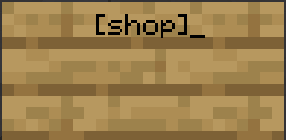
- Pick buy or sell. The shop menu opens and shows the items in your chest. Left click an item to set a buying price, or right click it to set a selling price. To open the menu again later, right click the sign.
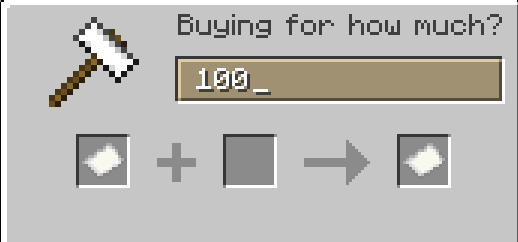
- Set the price. Type the price you want, then click the paper to move on. For example, buy or sell for $100, then click the paper.
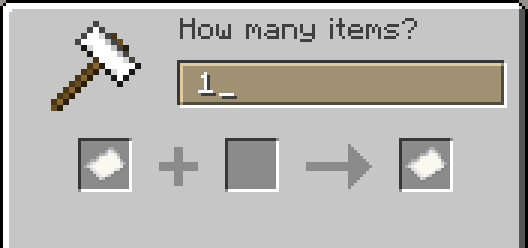
- Set the amount. The next menu asks how many items you buy or sell at that price. Type the amount and click the paper to confirm. For example, $100 for 1 stick.
- Buying price vs selling price: a buying price is what your shop pays players who sell you that item. A selling price is what players pay to buy that item from your chest.
- Clear an item: press your drop key (Q) on an item in the shop menu to clear its settings.
- Restock: restock or remove items as needed so your chest doesn't get overfilled or run empty.
- Remove a shop: breaking the sign deletes the shop attached to the chest.
Bulk pricing
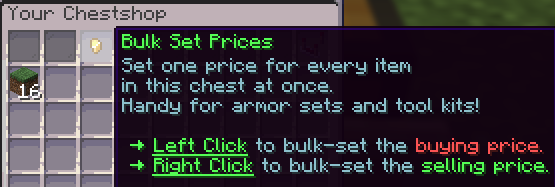
Your chest shop can bulk buy or bulk sell multiple items in one chest. The Bulk Set Prices button sets one price for every item in the chest at once, which is great for things like tomb armor sets and tool kits.- Left click to set a price for buying sets of items.
- Right click to set a price for selling sets of items.
Shop settings
At the top right of the chest shop menu there is a comparator. Click it to open the shop settings: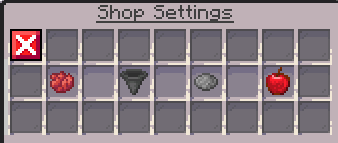
- Red Dye (Out of stock items): choose whether items that are out of stock still show in your shop.
- Hopper (Hopper settings): choose whether hoppers can move items in and out of your shop's chest.
- Gray Dye (Entity display): change the look of your shop with a custom entity display. See the Chest shop entities section below.
- Apple (Discounts): run a sale on specific items or on the whole shop.
Shop statistics
The Shop Statistics menu shows your transaction history, summaries, trends and shop visitors. You can view statistics daily, weekly or monthly, and filter them by item, so you can see what sells and change your buying and selling prices based on the numbers.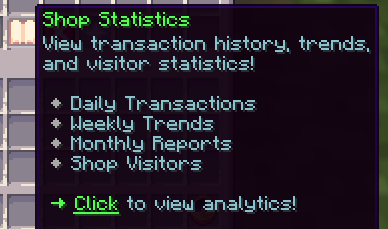
How many chest shops can I have?
Every player can make 4 chest shops, and store ranks unlock more. Each time you create a shop, chat tells you how many more you can make.On Survival you can also buy extra shop slots: type /chestshop (or /chestshops) and click Chest Shop Slots. Each slot costs $10M, and you can buy up to 100 extra slots. The same menu lists your shops and your Chest Shop Mastery progress.
Supplier and Remote shops
Want to sell from a chest tucked away in your storage room?- Put a sign on that chest with [Supplier] on the first line and a name for it on the second line.
- Place a sign anywhere nearby with [Remote] on the first line and the same name on the second line.
Chest Shop Mastery
Chest Shop Mastery rewards you with cosmetic chest shop entities, which you turn on in the shop settings (gray dye). The number of items your shops sell and the number of unique players who trade with you both count toward your mastery, and each level needs both. Mastery applies to all your shops.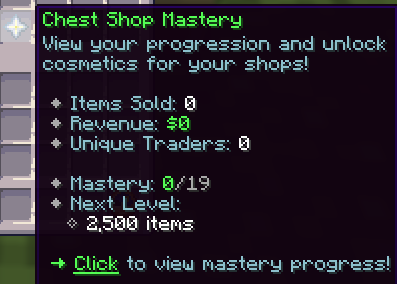
| Level | Items sold | Unique traders | Unlocks |
|---|---|---|---|
| 1 | 2,500 | 0 | Chicken Shop |
| 2 | 5,000 | 5 | Cow Shop |
| 3 | 7,500 | 10 | Pig Shop, White glow |
| 4 | 10,000 | 15 | Sheep Shop |
| 5 | 15,000 | 25 | Cat Shop, Red glow |
| 6 | 20,000 | 40 | Wolf Shop, Gold equipment |
| 7 | 30,000 | 60 | Fox Shop |
| 8 | 40,000 | 90 | Rabbit Shop, Green glow |
| 9 | 50,000 | 125 | Panda Shop |
| 10 | 75,000 | 175 | Villager Shop, Diamond equipment |
| 11 | 100,000 | 250 | Iron Golem Shop, Blue glow |
| 12 | 150,000 | 350 | Snow Golem Shop |
| 13 | 200,000 | 475 | Allay Shop |
| 14 | 250,000 | 575 | Axolotl Shop, Yellow glow |
| 15 | 300,000 | 675 | Bee Shop, Netherite equipment |
| 16 | 400,000 | 775 | Parrot Shop |
| 17 | 500,000 | 850 | Enderman Shop, Aqua glow |
| 18 | 750,000 | 925 | Wither Skeleton Shop |
| 19 | 1,000,000 | 1,000 | Blaze Shop |
Chest shop entities
Here is every chest shop entity and how to get it. Some entities have extra options: they can be a baby, wear armor, glow or be a different variant of that mob, so there are lots of fun choices.From Chest Shop Mastery:
- Chicken Shop: Mastery Level 1
- Cow Shop: Mastery Level 2
- Pig Shop: Mastery Level 3
- Sheep Shop: Mastery Level 4
- Cat Shop: Mastery Level 5
- Wolf Shop: Mastery Level 6
- Fox Shop: Mastery Level 7
- Rabbit Shop: Mastery Level 8
- Panda Shop: Mastery Level 9
- Villager Shop: Mastery Level 10
- Iron Golem Shop: Mastery Level 11
- Snow Golem Shop: Mastery Level 12
- Allay Shop: Mastery Level 13
- Axolotl Shop: Mastery Level 14
- Bee Shop: Mastery Level 15
- Parrot Shop: Mastery Level 16
- Enderman Shop: Mastery Level 17
- Wither Skeleton Shop: Mastery Level 18
- Blaze Shop: Mastery Level 19
- Armadillo, Bat, Bogged, Breeze, Camel Husk, Cave Spider, Cod, Copper Golem, Creaking, Creeper, Dolphin, Drowned, Endermite, Evoker, Frog, Glow Squid, Goat, Guardian, Husk, Llama, Magma Cube, Mooshroom, Nautilus, Ocelot, Parched, Phantom, Piglin, Piglin Brute, Pillager, Pufferfish, Salmon, Shulker, Silverfish, Skeleton, Slime, Spider, Squid, Stray, Strider, Tadpole, Trader Llama, Tropical Fish, Turtle, Vex, Villager, Vindicator, Wandering Trader, Warden, Witch, Wither, Zombie, Zombie Nautilus and Zombie Villager Shops
- Equipment: Leather, Chainmail, Iron, Gold, Diamond, Netherite
- Glow: Aqua, Blue, Green, Red, White, Yellow
- Particle effects: Dragon Breath, Enchant, Portal, Sculk Soul, Totem
Chest Shop FAQ
How do I make a chest shop on Complex Gaming?
Put a sign on the front, back or side of a chest, trapped chest or barrel and type [shop] on the first line. The shop menu opens right away so you can set your items and prices, and only you can edit the shop.
Which Complex Gaming servers have chest shops?
Chest shops work on Survival, Skyblock and Prison. Join at hub.mc-complex.com on Java, or on Bedrock with port 19132.
Can you make a chest shop on Complex Factions?
No. Complex Factions doesn't have chest shops. Chest shops are only on Complex Survival, Skyblock and Prison.
How many chest shops can I have?
Every player can own 4 chest shops, and store ranks raise that limit. On Survival you can also buy extra shop slots for $10M each in /chestshop, and chat tells you how many more shops you can make each time you create one.
How do I get more chest shop slots on Survival?
Type /chestshop on Complex Survival and click Chest Shop Slots. Each extra slot costs $10M, and you can buy up to 100 extra slots on top of your rank's limit.
What is the difference between a buying and selling price?
A buying price (left click) is what your shop pays players who sell that item to you. A selling price (right click) is what players pay to buy that item from your chest.
How do Supplier and Remote chest shops work?
Put a sign with [Supplier] on the first line and a name on the second line on your stock chest, then place a sign with [Remote] and the same name nearby for players to shop from. The Supplier must be within 10 blocks of the Remote sign for every shop you're allowed to own (40 blocks with the default 4 shops), and it counts toward your shop limit.
How do I remove a chest shop?
Break the shop's sign or its chest to delete the shop. Only the owner can break it, plus players who have shop chest permission on that claim, island or plot.
🎮 Ready to play?
hub.mc-complex.comJava 1.8 to the latest release (latest recommended), or Bedrock on port 19132
Pick Survival, Skyblock or Prison with the compass or NPCs at the hub
Skyblock Guides
Prison Guides
Factions Guides
Survival Guides
Minecraft Tips & Guides
Complex Gaming Network Information
Complex Gaming Partner Guides
Complex Gaming
Check out our quick links for fast access to important locations on the forums!
Support
Need assistance with purchases, or help in general?